

If your rankings have stalled, your traffic is flat, or you simply want to know where your website stands before you invest more budget into content or links, the first move is always the same: run a full SEO audit. An this process is the process of systematically reviewing every part of your website — from technical health to content quality to backlinks — so you know exactly what is holding your rankings back and what to fix first.
In 2026, this process looks a little different than it did a few years ago. Google’s algorithms now weigh page experience, Core Web Vitals, E-E-A-T signals, and AI-generated search summaries more heavily than ever. A basic checklist that only looks at title tags and broken links is no longer enough. If you want a refresher on the fundamentals before diving in, this beginner’s guide to what SEO actually is is a helpful starting point. From there, this guide walks you through a complete, modern SEO audit plan you can follow step by step, whether you’re auditing your own site or a client’s.
Whether you run an online store, a local service business, a blog, or a large content site, the underlying process stays the same: you inspect what’s working, flag what isn’t, and turn those findings into a prioritized to-do list. The only thing that changes between industries is which sections deserve the most attention.
By the end of this post, you’ll have a repeatable this review process you can run every quarter to keep your website healthy, competitive, and ready to rank.
What Is an SEO Audit?
An SEO audit is a structured evaluation of a website’s search engine optimization performance. It looks at how well a site can be crawled and indexed, how well individual pages are optimized for target keywords, how strong the backlink profile is, and how the site performs from a technical and user-experience standpoint.
Think of an the audit as a health checkup for your website. Just like a doctor checks your blood pressure, heart rate, and bloodwork before recommending treatment, an SEO audit checks your site’s crawlability, indexing status, page speed, content quality, and link profile before you decide where to focus your optimization efforts.
A proper audit of this kind usually covers five core areas:
- Technical SEO
- On-page SEO
- Content quality
- Off-page SEO (backlinks)
- Local SEO (if applicable)
Each of these areas plays a role in how Google evaluates and ranks your site, so skipping any one of them during your review can leave you with an incomplete picture.
Why an SEO Audit Matters More in 2026
Search is changing fast. AI Overviews, zero-click results, and stricter helpful-content standards mean that websites need to work harder to earn (and keep) visibility. Here’s why running an this audit process is more important now than ever:
- AI-driven search results are pulling answers directly into the search results page, so thin or poorly structured content gets skipped entirely. An SEO audit helps you spot pages that need better structure or depth.
- Core Web Vitals and page experience remain a ranking factor, and mobile-first indexing means a slow or clunky mobile experience can quietly tank your rankings.
- E-E-A-T (Experience, Expertise, Authoritativeness, Trustworthiness) signals matter more, especially for YMYL (Your Money, Your Life) topics, and a content-focused this checkup identifies where trust signals are missing.
- Algorithm updates roll out more frequently, and a routine SEO audit helps you catch ranking drops early instead of finding out months later when the damage is already done.
- Competitors are auditing their own sites, and if you’re not doing the same, you’re leaving easy wins on the table.
If you’ve never run a full this exercise, or it’s been more than six months since your last one, now is the time.
How Long Does an SEO Audit Take?
Timelines vary depending on site size and how deep you go, but as a general benchmark: a small business site with under 50 pages usually takes a day or two to review thoroughly. A mid-sized site with a few hundred pages can take a week when you factor in competitor research and content categorization. Large ecommerce or publisher sites with thousands of URLs often need two to three weeks, especially if the technical crawl surfaces widespread issues that need pattern-based fixes rather than page-by-page corrections.
It helps to time-box each section rather than trying to perfect everything in one sitting. Spend a fixed block on technical checks, a fixed block on content review, and a fixed block on backlinks, then move on. You can always come back to a section for a deeper pass once the highest-priority fixes from the first round are live.
How Often Should You Run an SEO Audit?
For most websites, a full SEO audit once every quarter is a healthy cadence. Larger or fast-changing sites (ecommerce, news, or sites publishing frequently) may benefit from a lighter monthly check plus a deep the review process every three months. Smaller local business sites can often get away with a thorough SEO audit twice a year, paired with light monitoring in between using Google Search Console.
If you’ve recently redesigned your site, migrated domains, or noticed a sudden traffic drop, that’s an immediate trigger to run an this process regardless of your normal schedule.
The Complete SEO Audit Checklist for 2026
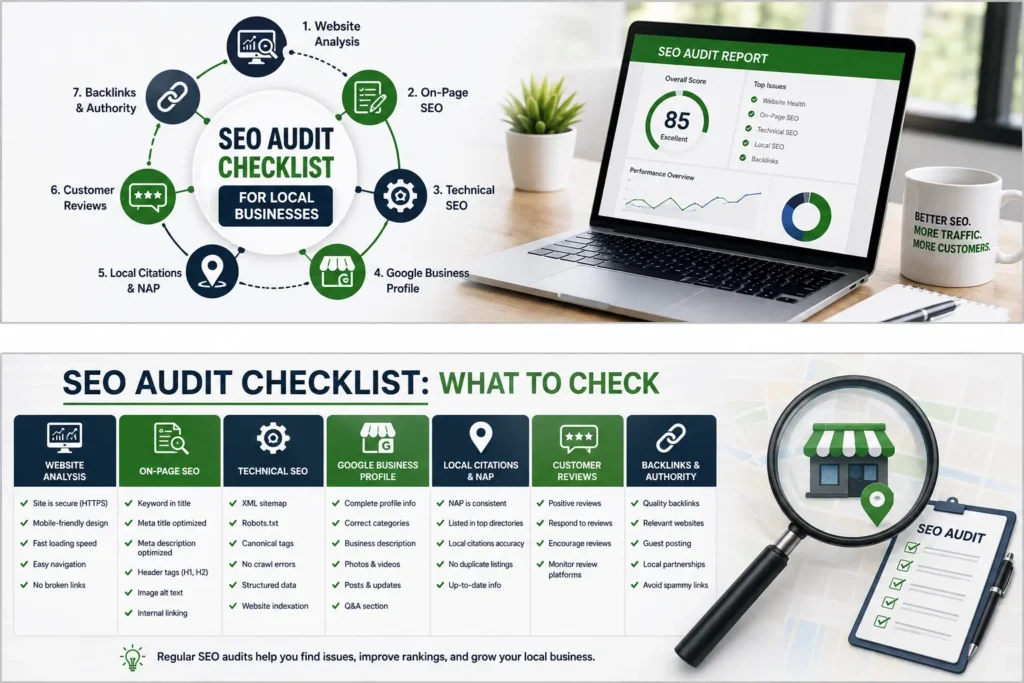
Below is the step-by-step process we recommend for a thorough SEO audit. You can work through these sections in order, or jump to whichever area concerns you most. If you’d like a printable version to follow along, our complete SEO audit checklist covers each of these steps in a downloadable format.
Step 1: Technical SEO Audit
Technical issues are often the root cause of ranking problems, which is why every this review should start here. If Google can’t crawl or index your pages properly, nothing else in your audit matters. For a broader rundown of technical fundamentals, our technical SEO guide is a good companion to this section.
What to check during the technical portion of your SEO audit:
- Crawlability — Use Google Search Console’s Crawl Stats report to confirm Googlebot can access your site without errors. If you haven’t connected Search Console yet, our guide on setting up and using Google Search Console walks through the process.
- Indexing status — Check the Pages report in Search Console for pages marked “Excluded” or “Not indexed,” and figure out why. Our guide to fixing indexing issues in Search Console covers this in detail, and this coverage report walkthrough is another useful reference for diagnosing those errors.
- XML sitemap — Confirm your sitemap is submitted, up to date, and free of broken or non-canonical URLs.
- Robots.txt — Make sure you aren’t accidentally blocking important sections of your site.
- Site architecture — Look for pages buried more than three clicks from the homepage; these often get crawled less frequently.
- HTTPS and security — Confirm your entire site runs on HTTPS with no mixed-content warnings.
- Duplicate content and canonicalization — Check for duplicate URLs (with and without trailing slashes, parameters, etc.) and confirm canonical tags are set correctly.
- Core Web Vitals — Review LCP, INP, and CLS scores in Search Console or PageSpeed Insights. A deep dive into how Core Web Vitals are measured and common causes of poor scores can help you interpret the results.
- Site speed — Slow-loading pages hurt both rankings and conversions; our guide on website speed and its impact on SEO explains what to prioritize.
- Mobile-friendliness — Test key pages using Google’s mobile-friendly testing tools, since mobile-first indexing means this can’t be skipped in any the audit.
A technical SEO audit typically surfaces the highest-impact fixes because these issues affect every page on your site at once, not just one piece of content. For a full list of technical checkpoints, this technical SEO checklist is a solid supplementary resource.
Step 2: On-Page SEO Audit
Once the technical foundation is confirmed, the next stage of your SEO audit is reviewing on-page elements page by page.
Key on-page factors to review:
- Title tags — Each page should have a unique, keyword-relevant title tag under roughly 60 characters.
- Meta descriptions — While not a direct ranking factor, compelling meta descriptions improve click-through rate, which is why they’re worth reviewing during your SEO audit.
- Header structure (H1–H6) — Confirm each page has a single, clear H1 and a logical heading hierarchy.
- Keyword usage — Check that target keywords appear naturally in the title, first paragraph, and a few subheadings, without keyword stuffing.
- Internal linking — Pages with strong internal linking tend to rank better because they distribute authority throughout the site. For a full breakdown of on-page factors, see our detailed on-page SEO guide.
- Image optimization — Check alt text, file names, and image compression across your top pages.
- URL structure — Short, descriptive, keyword-relevant URLs are easier for both users and search engines to understand.
- Content-to-keyword alignment — Confirm the page actually satisfies the search intent behind its target keyword, not just the keyword’s literal presence.
This part of the SEO audit is where you’ll often find quick wins — pages that are close to ranking well but just need a stronger title tag or better internal linking to push them over the edge.
Step 3: Content Quality Audit
Content is where most modern SEO audit processes spend the bulk of their time, because Google’s helpful-content systems are increasingly good at identifying thin, outdated, or low-value pages.
During the content stage of your SEO audit, ask:
- Is this page genuinely useful, or does it exist purely to target a keyword?
- Is the information current, or does it reference outdated statistics, tools, or practices?
- Does the page demonstrate real experience or expertise on the topic?
- Are there thin pages (under 300–400 words) that could be consolidated or expanded?
- Are there cannibalizing pages targeting the same keyword that should be merged?
- Does the content answer the questions searchers are actually asking?
A useful way to organize this stage of your SEO audit is to bucket every page into one of three categories: keep as-is, update and improve, or consolidate/remove. This turns a vague content review into a clear action plan.
If keyword research feels like the weak link in your content strategy, our guide on finding low-competition keywords or our piece on keyword research for local businesses can help you find better targets before you rewrite anything.
Step 4: Off-Page and Backlink Audit
Backlinks remain one of the strongest ranking signals, so no SEO audit is complete without reviewing your link profile.
What to check:
- Total referring domains — Are you gaining or losing linking domains over time?
- Link quality — Are your backlinks coming from relevant, authoritative sites, or from spammy directories?
- Toxic links — Identify any links that could be triggering a manual action or algorithmic penalty, and disavow them if necessary.
- Anchor text distribution — An unnatural pattern (too many exact-match anchors) can look manipulative to Google.
- Competitor backlink gaps — Look at where competitors are earning links that you aren’t.
If link building is an area you want to strengthen after your SEO audit, our guides on link building and link building techniques outline practical, white-hat strategies to grow your backlink profile, and this guide on getting backlinks offers additional outreach tactics worth exploring.
Step 5: Local SEO Audit (If Applicable)
If your business serves a specific geographic area, your SEO audit should include a local SEO review as well. For a broader overview of this area, our local SEO guide for small businesses and this local SEO guide both cover the fundamentals in more depth.
Local elements to check:
- Google Business Profile completeness and accuracy — Review your categories, hours, photos, and services against our Google Business Profile optimization checklist.
- NAP consistency — Confirm your Name, Address, and Phone number match exactly across your site and local citation sources.
- Reviews — Assess your review volume, recency, and response rate; our guide on getting more Google reviews offers practical tactics.
- Local landing pages — Confirm you have dedicated, well-optimized pages for each service area rather than one generic “service area” page.
- Map pack visibility — Check where you currently rank in the local map pack for your priority keywords, and review the Google Business Profile ranking factors that influence it.
A local-focused SEO audit is especially important for service-based businesses like contractors, clinics, and law firms, where map pack visibility often drives more calls than organic rankings alone.
Step 6: Competitor Analysis
A complete SEO audit doesn’t just look inward — it benchmarks your site against competitors who are already ranking well.
- Identify your top 3–5 organic competitors for your priority keywords.
- Compare content depth, page speed, and backlink profiles side by side.
- Look for keyword gaps: terms competitors rank for that you don’t.
- Note structural or UX advantages competitors have that you could adopt.
This comparative step of your SEO audit often reveals opportunities that a purely internal review would miss.
Tools You Need for an SEO Audit
You don’t need dozens of tools to run a solid SEO audit, but a few core ones make the process far more efficient:
- Google Search Console — Free, essential, and the first place to start any SEO audit.
- Google PageSpeed Insights / Core Web Vitals report — For technical performance data.
- Screaming Frog (or a similar crawler) — To crawl your site and surface broken links, redirect chains, and missing metadata.
- A rank tracking tool — To measure keyword position changes before and after your SEO audit.
- A backlink analysis tool — To review your link profile and spot toxic links.
- Google Analytics (GA4) — To connect technical and content findings back to actual traffic and conversion data.
Combining free tools like Search Console with one or two paid platforms is usually enough to run a thorough SEO audit without overspending.
Common SEO Audit Mistakes to Avoid
Even experienced marketers make mistakes when running an SEO audit. Watch out for these:
- Treating the audit as a one-time task. An SEO audit should be a recurring process, not something you do once and forget.
- Focusing only on technical issues. Technical fixes matter, but ignoring content quality and backlinks leaves major gaps in your SEO audit.
- Not prioritizing findings. A long list of issues without prioritization is overwhelming and rarely gets acted on. Rank issues by impact and effort.
- Ignoring mobile experience. With mobile-first indexing, any SEO audit that only checks desktop performance is incomplete.
- Skipping the competitive comparison. Without benchmarking against competitors, it’s hard to know if your numbers are actually good or bad.
- Not tracking results after fixes. After you complete an SEO audit and implement changes, track rankings and traffic for at least 4–8 weeks to measure impact.
Turning Your SEO Audit Into an Action Plan
An SEO audit is only valuable if it leads to action. Once you’ve completed each section above, organize your findings into a simple prioritization matrix:
- High impact, low effort — Fix these first (broken redirects, missing title tags, quick technical fixes).
- High impact, high effort — Plan these into your next few sprints (content rewrites, site architecture changes).
- Low impact, low effort — Batch these together and knock them out when time allows.
- Low impact, high effort — Deprioritize unless they support a larger strategic goal.
This structure turns your SEO audit from a static report into a working roadmap your team can actually execute. For a broader look at building that roadmap, our guide on building an effective SEO strategy pairs well with the findings from your audit, and if you want to sanity-check whether your current approach is working, our post on signs your SEO strategy isn’t working is worth a read too.
Free SEO Audit Checklist
If you’d rather work from a printable checklist while you complete each of the steps above, we’ve put together a complete SEO audit checklist you can follow section by section, from technical checks through content and backlink review.
What to Include in Your SEO Audit Report
Once you’ve worked through every section above, it helps to package your findings into a single report rather than leaving notes scattered across spreadsheets and screenshots. A clear report makes it far easier to get buy-in from stakeholders, hand work off to a developer or writer, and track progress over time.
A solid report typically includes:
- An executive summary — A short, plain-language overview of the site’s overall health and the two or three biggest opportunities uncovered.
- A scorecard by category — Simple ratings (good, needs work, critical) for technical health, on-page optimization, content quality, backlinks, and local signals if relevant.
- A prioritized issue list — Every problem found, sorted by impact and effort, with a clear owner and rough timeline for each fix.
- Before-and-after benchmarks — Baseline metrics (rankings, organic traffic, Core Web Vitals scores, indexed page count) captured at the start, so you can measure progress after changes go live.
- Supporting screenshots or data exports — Evidence from Search Console, your crawler, or your rank tracker that backs up each finding, so decisions aren’t based on guesswork.
Keeping this report format consistent every time you run through the process makes each future pass faster, since you’re simply updating the same scorecard rather than starting from a blank page. Over a year of quarterly reviews, this also gives you a clean historical record of how your site’s health has trended, which is often more useful for spotting slow-building problems than any single snapshot on its own.
Frequently Asked Questions
Do I need to hire an agency to run an SEO audit, or can I do it myself? Many small business owners can work through the checklist above on their own, especially with free tools like Google Search Console and PageSpeed Insights. Larger or more competitive sites often benefit from bringing in a specialist, particularly for the technical crawl and backlink review, where experience helps you interpret the data correctly rather than just collecting it.
What’s the difference between a technical review and a full audit? A technical review only looks at crawlability, indexing, speed, and site structure. A full review goes further, adding on-page optimization, content quality, backlink health, and local signals where relevant. Technical checks are usually the fastest to complete and the easiest to act on, which is why they’re a good starting point, but they’re only one piece of the bigger picture.
Will fixing the issues found guarantee higher rankings? No single process guarantees rankings, since Google weighs hundreds of signals and competitors are making changes too. What a thorough review does is remove obstacles that are actively holding your pages back and highlight opportunities you might not have noticed otherwise, which puts you in a stronger position to compete.
Can I use free tools only, without paying for anything? Yes. Google Search Console, PageSpeed Insights, and Google Analytics are free and cover a large portion of what’s needed. Paid tools mainly add convenience, deeper backlink data, and competitor visibility, but they aren’t strictly required to get started.
How do I know if my last review is out of date? If it’s been more than two or three months since your last check, or if you’ve published new content, changed your site structure, or noticed a ranking or traffic drop, it’s time to run through the checklist again. Search algorithms and competitor activity both shift constantly, so what was accurate a few months ago may no longer reflect your site’s current standing.
Final Thoughts on Running an SEO Audit in 2026
Search engines are only getting smarter, and the sites that consistently rank well in 2026 are the ones that treat SEO as an ongoing discipline, not a one-time project. Running a regular SEO audit gives you a clear, evidence-based view of what’s working, what’s broken, and where your next round of effort will have the biggest payoff.
Start with the technical foundation, move through on-page and content quality, review your backlink profile, and don’t forget local signals if they apply to your business. Do this consistently, and every future SEO audit will take less time and uncover fewer surprises — because you’ll already be staying ahead of the issues that used to catch you off guard.
If you’re not sure where to begin, start small: connect Search Console, pull your Core Web Vitals report, and work through the technical checklist in Step 1. That first pass alone will tell you more about your site’s health than months of guessing ever could.
