
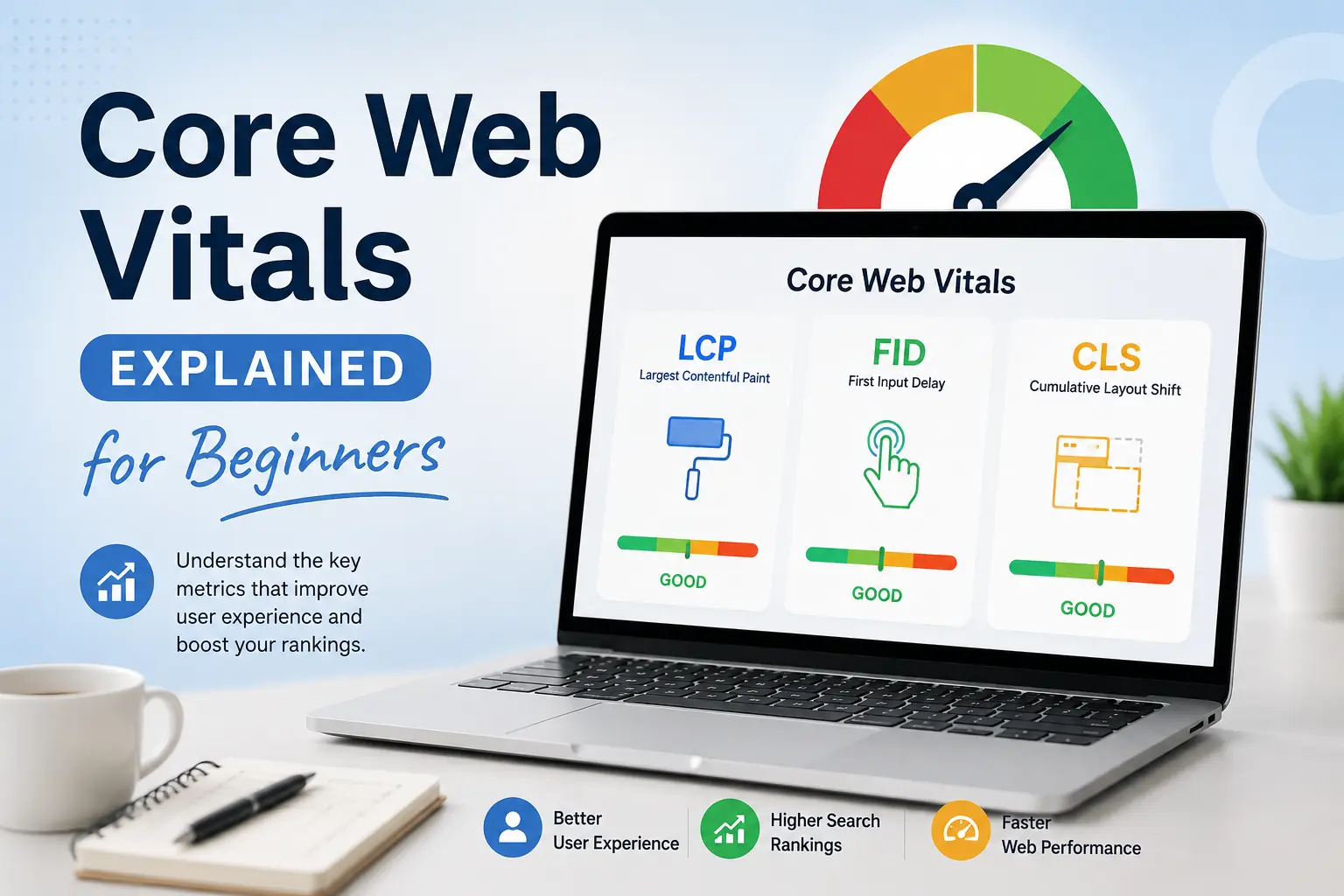
If you have spent any time reading about technical SEO in the last few years, you have almost certainly run into the term Core Web Vitals. Google mentions them in its documentation, SEO tools build entire dashboards around these scores, and website owners panic every time their numbers turn red in Search Console. Yet for beginners, Core Web Vitals can feel like a confusing mix of acronyms, numbers, and thresholds that nobody bothers to explain in plain English.
This guide breaks down Core Web Vitals from the ground up. By the end, you will understand what they are, why they matter for SEO and user experience, how each metric is measured, and — most importantly — practical steps you can take to improve your Core Web Vitals scores, even if you are not a developer.
What Are Core Web Vitals?
Core Web Vitals are a specific set of performance metrics that Google uses to measure real-world user experience on a webpage. They were introduced by Google as part of a broader initiative called Web Vitals, which aims to give website owners a standardized way to evaluate page speed, visual stability, and interactivity.
Unlike generic speed tests that only look at how fast a server responds, this framework focuses on how a page actually feels to a real visitor. Does the main content load quickly? Does the page respond right away when someone clicks a button? Does the layout jump around while the page is loading? These are the kinds of questions Core Web Vitals were designed to answer.
Google currently defines Core Web Vitals using three metrics:
- Largest Contentful Paint (LCP) — measures loading performance
- Interaction to Next Paint (INP) — measures responsiveness
- Cumulative Layout Shift (CLS) — measures visual stability
Together, these three metrics give a fairly complete picture of the user experience on any given page. If your Core Web Vitals scores are strong, your visitors are likely enjoying a fast, stable, and responsive experience. If they are weak, visitors are probably dealing with slow loading, janky layouts, or a sluggish interface — all of which can hurt conversions, engagement, and rankings.
Why Core Web Vitals Matter for SEO
Google has confirmed that Core Web Vitals are a ranking factor as part of its “page experience” signals. That does not mean they are the single most important ranking factor — content relevance and quality still matter far more — but Core Web Vitals can act as a tiebreaker between pages that are otherwise similar in quality.
Here is why Core Web Vitals matter beyond just rankings:
- User experience: Core Web Vitals were built around real user behavior data, so improving these scores almost always improves the actual experience of visiting your site.
- Bounce rate: Pages with poor Core Web Vitals scores, especially slow LCP, tend to have higher bounce rates because visitors leave before the content even loads.
- Conversions: E-commerce studies consistently show that faster, more stable pages — the kind that score well on Core Web Vitals — convert better than slow, shifting ones.
- Mobile experience: Since most of the web is browsed on mobile, and mobile devices often have slower processors and connections, Core Web Vitals issues tend to be more visible and more damaging on mobile.
- Competitive advantage: If two competing pages have similar content and backlinks, the page with better Core Web Vitals has an edge in Google’s eyes.
If you already work on technical SEO and page speed for your website, you have likely already touched on Core Web Vitals without necessarily calling it that. Core Web Vitals are essentially a more formalized, standardized version of the page speed and usability principles that good technical SEO has always cared about.
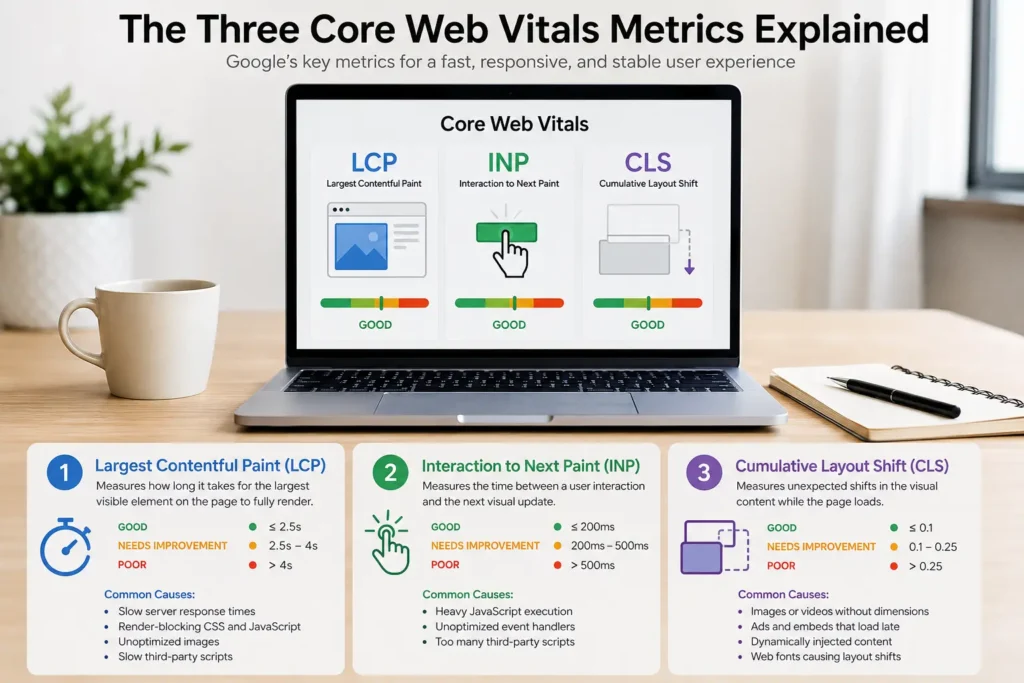
The Three Core Web Vitals Metrics Explained
Let’s go through each of the three Core Web Vitals metrics one at a time, in plain language.
1. Largest Contentful Paint (LCP)
Largest Contentful Paint, or LCP, is the first of the three Core Web Vitals metrics, and it measures loading performance. Specifically, LCP tracks how long it takes for the largest visible element on the page — usually a hero image, a large block of text, or a banner — to fully render on the screen.
Why does this Core Web Vitals metric focus on the largest element instead of the first element? Because the largest element is usually what a visitor perceives as the “main content” of the page. A tiny loading spinner appearing instantly does not mean much to the user; what matters is when the actual content they came for shows up.
Google’s Core Web Vitals thresholds for LCP:
- Good: 2.5 seconds or less
- Needs Improvement: 2.5 to 4 seconds
- Poor: more than 4 seconds
Common causes of a poor LCP score include slow server response times, render-blocking JavaScript and CSS, unoptimized images, and slow third-party scripts. If you have ever run a Core Web Vitals report and seen a red LCP score, these are usually the first places to look.
2. Interaction to Next Paint (INP)
Interaction to Next Paint, or INP, is the responsiveness metric among the Core Web Vitals. INP replaced an older metric called First Input Delay (FID) in March 2024 because INP gives a more complete picture of how a page responds throughout the entire visit, not just on the very first interaction.
INP measures the time between a user interaction — a click, a tap, a key press — and the moment the browser is able to visually respond to that interaction. A low INP score in your Core Web Vitals report means your page feels snappy and responsive. A high INP score means users are clicking buttons and waiting, which is one of the most frustrating experiences on the web.
Google’s Core Web Vitals thresholds for INP:
- Good: 200 milliseconds or less
- Needs Improvement: 200 to 500 milliseconds
- Poor: more than 500 milliseconds
Heavy JavaScript execution, unoptimized event handlers, and too many third-party scripts (chat widgets, analytics tags, ad scripts) are the usual suspects behind poor INP scores in Core Web Vitals audits.
3. Cumulative Layout Shift (CLS)
Cumulative Layout Shift, or CLS, is the visual stability metric in the Core Web Vitals trio. CLS measures how much the visible content of a page shifts around unexpectedly while it loads. You have probably experienced this yourself: you go to tap a button, and at the last second an ad or image loads in above it, so you end up clicking the wrong thing entirely.
CLS is calculated using a formula that combines how much of the viewport shifted and how far it shifted. Rather than being measured in seconds or milliseconds like the other two Core Web Vitals metrics, CLS is expressed as a unitless score.
Google’s Core Web Vitals thresholds for CLS:
- Good: 0.1 or less
- Needs Improvement: 0.1 to 0.25
- Poor: more than 0.25
The most common causes of poor CLS in Core Web Vitals reports are images or videos without defined dimensions, ads and embeds that load late, dynamically injected content, and web fonts that cause a visible “flash” of unstyled or resized text (often called FOUT or FOIT).
How Core Web Vitals Are Measured: Field Data vs. Lab Data
One of the more confusing parts of Core Web Vitals for beginners is understanding that there are two different ways to measure them: field data and lab data. Both matter, but they answer different questions.
Field Data (Real User Monitoring)
Field data for Core Web Vitals comes from actual visitors using your site in the real world. Google collects this data through the Chrome User Experience Report (CrUX), which anonymously tracks performance metrics from real Chrome users who have opted into sharing usage statistics. This is the data source Google actually uses when considering Core Web Vitals as a ranking signal, because it reflects real conditions — real devices, real network speeds, real locations.
Field data for Core Web Vitals is what you will see in:
- Google Search Console’s Core Web Vitals report
- The Chrome User Experience Report (CrUX) dashboard
- PageSpeed Insights (the “Field Data” section)
Lab Data (Simulated Testing)
Lab data for Core Web Vitals comes from simulated tests run in a controlled environment, such as Lighthouse. Lab data is useful for debugging because it is consistent, repeatable, and available immediately — even for brand-new pages that don’t yet have enough real-world traffic to generate field data.
Lab data for Core Web Vitals is what you will see in:
- Lighthouse reports (built into Chrome DevTools)
- PageSpeed Insights (the “Lab Data” section)
- WebPageTest
The key takeaway is that lab data helps you diagnose and fix issues before they go live, while field data tells you how your Core Web Vitals are actually performing for real visitors — and it is the field data that influences rankings.
Tools to Check Your Core Web Vitals Scores
You do not need expensive software to start monitoring Core Web Vitals. Here are the most reliable free tools:
- Google Search Console — The report inside Search Console groups your URLs by status (Good, Needs Improvement, Poor) using real field data. If you haven’t connected your site yet, our guide to Google Search Console walks you through setup and how to read your performance reports, including the Core Web Vitals section.
- PageSpeed Insights — This free tool from Google shows both field data and lab data for any public URL, broken down by mobile and desktop, along with specific Core Web Vitals recommendations.
- Chrome DevTools (Lighthouse) — Built directly into Chrome, Lighthouse lets you run an on-demand Core Web Vitals audit of any page you’re working on, even before it’s published.
- Chrome UX Report (CrUX) — This is the underlying dataset that powers most Core Web Vitals field data reporting across Google’s tools.
- Web Vitals Chrome Extension — A lightweight browser extension that shows live Core Web Vitals scores as you browse.
Running your Core Web Vitals numbers through more than one tool is a good habit, since lab data and field data can sometimes tell slightly different stories.
How Core Web Vitals Affect Google Rankings
Google folds these metrics into a broader group of ranking signals called “page experience,” which also includes mobile-friendliness, HTTPS security, and the absence of intrusive interstitials. Core Web Vitals themselves account for the loading, interactivity, and stability portion of that page experience signal.
In practical terms, Core Web Vitals rarely make or break a ranking on their own. A page with brilliant content and a slightly slow LCP score will usually still outrank a thin, poorly written page with perfect scores. But when two pages are competing on similar content quality and similar backlink profiles — which happens constantly in competitive niches — Core Web Vitals can be the deciding factor.
This matters even more for local and service-based businesses. If you run local SEO campaigns for small businesses or manage a Google Business Profile, a slow website with poor Core Web Vitals can quietly undo a lot of the trust and momentum you build through local search efforts, because visitors who click through from a Google Business Profile listing tend to be even less patient than average.
Common Causes of Poor Core Web Vitals Scores
Understanding why Core Web Vitals scores drop is just as important as knowing what the metrics mean. Here are the most frequent culprits behind poor Core Web Vitals results:
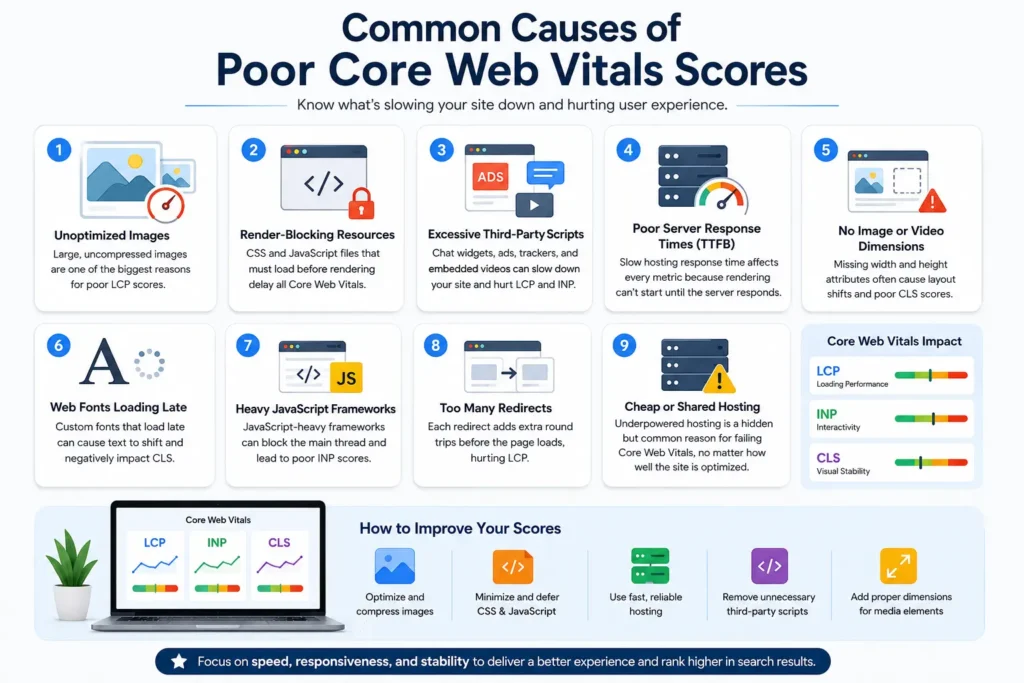
- Unoptimized images: Large, uncompressed images are one of the single biggest contributors to poor LCP scores in Core Web Vitals audits.
- Render-blocking resources: CSS and JavaScript files that must load before the page can render will delay every Core Web Vitals metric tied to loading.
- Excessive third-party scripts: Chat widgets, ad networks, tracking pixels, and embedded videos often load heavy scripts that hurt both LCP and INP.
- Poor server response times (TTFB): If your hosting is slow to respond, every downstream Core Web Vitals metric suffers, because nothing can start rendering until the server responds.
- No image or video dimensions: Missing width and height attributes are a classic cause of poor CLS scores in Core Web Vitals reports.
- Web fonts loading late: Custom fonts that swap in after the page has already rendered can cause layout shifts that hurt CLS.
- Heavy JavaScript frameworks: Sites built with JavaScript-heavy frameworks sometimes struggle with INP because the browser’s main thread gets blocked by script execution.
- Too many redirects: Each redirect adds extra round trips before the browser can even start loading the page, which drags down LCP.
- Cheap or shared hosting: Underpowered hosting infrastructure is a hidden but very common reason websites struggle to pass Core Web Vitals thresholds, regardless of how well the front end is optimized.
How to Improve Core Web Vitals: A Practical Checklist
Now that you understand what hurts Core Web Vitals scores, let’s look at how to fix them. Below is a practical, beginner-friendly checklist broken down by each metric.
Improving LCP (Loading)
- Compress and resize images before uploading them, and use modern formats like WebP or AVIF.
- Use a content delivery network (CDN) to serve assets closer to your visitors.
- Enable browser caching and server-side caching to reduce repeat load times.
- Preload your most important above-the-fold image or font.
- Remove or defer render-blocking CSS and JavaScript.
- Upgrade to faster, more reliable hosting if your server response time is consistently slow.
Improving INP (Interactivity)
- Break up long-running JavaScript tasks into smaller chunks so the browser’s main thread doesn’t get blocked.
- Audit and remove unnecessary third-party scripts, especially ones that aren’t essential to the page.
- Use lazy loading for scripts and widgets that aren’t needed immediately.
- Minimize the use of heavy animation libraries on interactive elements.
- Regularly test interactive elements like menus, forms, and buttons using Lighthouse to catch INP regressions in your Core Web Vitals scores early.
Improving CLS (Visual Stability)
- Always specify width and height attributes (or aspect-ratio in CSS) for images and videos.
- Reserve space for ads and embeds before they load, so nothing pushes content around.
- Avoid inserting new content above existing content unless it’s in response to a user action.
- Use
font-display: optionalor preload critical fonts to reduce font-swap layout shifts. - Test your key landing pages after every major design change, since new elements are a common source of new Core Web Vitals layout shift problems.
If your website is built on WordPress or another CMS and these fixes sound overwhelming, working with a development team that specializes in WordPress web design or dedicated website speed and performance optimization can save a lot of trial and error, since many Core Web Vitals issues are baked into theme code, plugins, or hosting configuration rather than content itself.
Core Web Vitals and Hosting: Why Your Server Matters
A surprising number of Core Web Vitals problems trace back to hosting rather than front-end code. If your hosting provider is slow to respond, overloaded, or lacking basic performance features like caching and a CDN, no amount of image compression will fully fix your scores.
Signs your hosting might be dragging down your Core Web Vitals include:
- Time to First Byte (TTFB) consistently above 600 milliseconds
- LCP scores that stay poor even after optimizing images and code
- Performance that degrades noticeably during traffic spikes
- Shared hosting plans with hundreds of other sites on the same server
If hosting is the bottleneck behind your Core Web Vitals scores, it may be worth exploring managed hosting management services that are specifically configured for speed and stability, rather than trying to optimize your way around a fundamentally slow server.
Core Web Vitals for Mobile vs. Desktop
Google evaluates Core Web Vitals separately for mobile and desktop, and it primarily uses mobile data for ranking purposes because of mobile-first indexing. This distinction matters a lot, because mobile devices typically have less processing power and often connect over slower, less stable networks than desktops.
It’s common to see a page pass these thresholds comfortably on desktop while failing the same thresholds on mobile. If you only check your Core Web Vitals scores on desktop, you could be missing serious issues that are actively hurting your rankings and user experience on mobile — which, for most industries, represents the majority of traffic.
Always check your Core Web Vitals reports for both device types, and prioritize fixing mobile issues first, since that’s the dataset Google leans on most heavily.
Core Web Vitals in Context: Industry-Specific Examples
Core Web Vitals problems don’t look the same across every type of website. A few examples:
- Service businesses: Sites for trades like HVAC companies often suffer from bloated theme builders, heavy sliders, and stock photo galleries that hurt LCP and CLS scores in Core Web Vitals reports.
- E-commerce sites: Product pages with dozens of images, reviews widgets, and upsell scripts frequently struggle with INP because so many scripts compete for the browser’s attention.
- Local business directories: Sites relying on embedded maps and third-party review widgets often see CLS spikes in their Core Web Vitals data because those embeds load asynchronously and shift content around.
Regardless of industry, the underlying Core Web Vitals principles — fast loading, quick responsiveness, and visual stability — apply universally.
Common Mistakes Beginners Make with Core Web Vitals
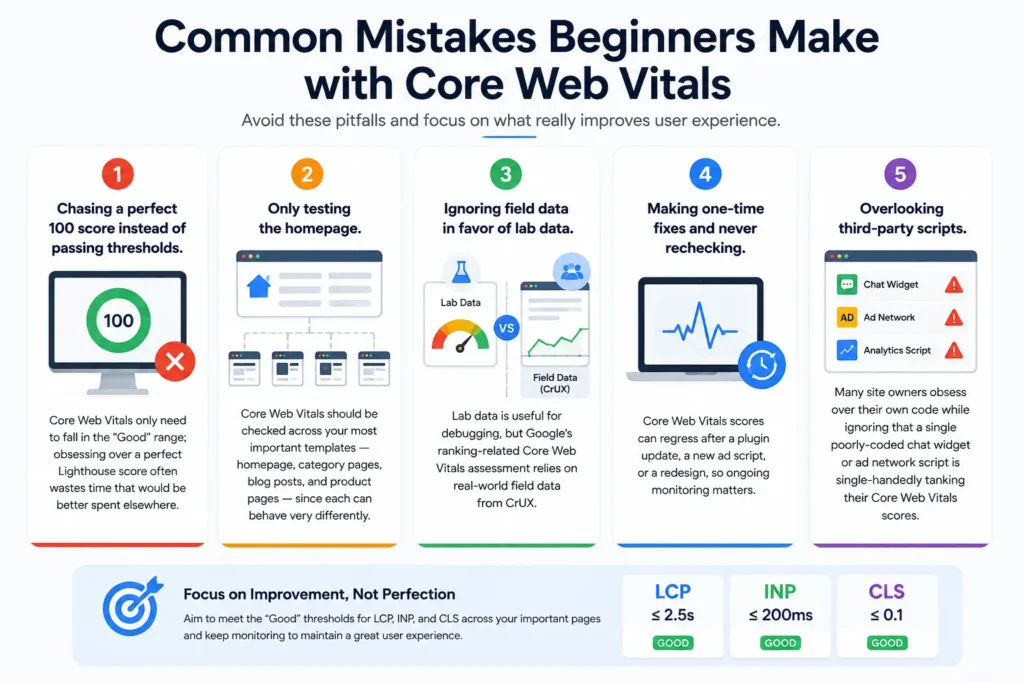
- Chasing a perfect 100 score instead of passing thresholds. Core Web Vitals only need to fall in the “Good” range; obsessing over a perfect Lighthouse score often wastes time that would be better spent elsewhere.
- Only testing the homepage. Core Web Vitals should be checked across your most important templates — homepage, category pages, blog posts, and product pages — since each can behave very differently.
- Ignoring field data in favor of lab data. Lab data is useful for debugging, but Google’s ranking-related Core Web Vitals assessment relies on real-world field data from CrUX.
- Making one-time fixes and never rechecking. Core Web Vitals scores can regress after a plugin update, a new ad script, or a redesign, so ongoing monitoring matters.
- Overlooking third-party scripts. Many site owners obsess over their own code while ignoring that a single poorly-coded chat widget or ad network script is single-handedly tanking their Core Web Vitals scores.
Core Web Vitals FAQs
Do Core Web Vitals apply to every page on my site, or just the homepage? Core Web Vitals are evaluated on a per-URL and per-template basis. Google groups similar page types together when reporting scores in Search Console, so a template-wide issue (like a slow header script) can affect many pages at once.
How long does it take for Core Web Vitals improvements to show up in Search Console? Because field data relies on 28-day rolling windows of real user data, it typically takes around four weeks for improvements to fully reflect in Google’s Core Web Vitals reports, even though lab tools like PageSpeed Insights will show improvements instantly.
Can a page rank well with poor Core Web Vitals? Yes. Content relevance, backlinks, and search intent still outweigh Core Web Vitals in most ranking scenarios. However, poor scores put you at a disadvantage against equally strong competitors, and they directly hurt user experience and conversions regardless of rankings.
Is INP harder to improve than LCP and CLS? Many beginners find INP the trickiest of the three Core Web Vitals metrics to fix because it often requires touching JavaScript execution rather than just images or CSS. Auditing third-party scripts is usually the fastest way to see meaningful INP improvement.
Do Core Web Vitals matter for SEO tools like keyword research? Not directly — they are a technical and user-experience signal, separate from processes like keyword research or link building. But a strong technical foundation, including healthy Core Web Vitals, makes every other SEO effort more effective, since it ensures visitors who find you through keywords or backlinks actually stick around.
Final Thoughts on Core Web Vitals
Core Web Vitals can feel intimidating at first, especially with all the acronyms — LCP, INP, CLS, TTFB, CrUX. But at their core, they are simply a structured way of asking three very human questions: Does the page load fast enough? Does it respond when I interact with it? Does it stay visually stable while I read it?
If you focus on optimizing images, trimming unnecessary scripts, choosing solid hosting, and testing regularly across both mobile and desktop, your scores will naturally improve — and so will the experience of every visitor who lands on your site. Pairing strong Core Web Vitals with the rest of your technical SEO foundation, from Google Search Console monitoring to website speed optimization, gives you one of the most reliable, long-term advantages available in organic search.
Core Web Vitals are not a one-time project — they’re an ongoing part of maintaining a healthy, competitive website. Start by checking your current scores today, fix the biggest issues first, and build regular monitoring into your site maintenance routine going forward.
