
Every day, thousands of websites are hacked, defaced, or quietly infected with malware. Most of them are not major corporations. They are small business sites, blogs, and online stores whose owners never imagined they were worth attacking. If you run a website of any size, knowing how to secure a website is no longer optional. It is a core part of doing business online.
Attackers rely on automation. Bots scan millions of pages every hour looking for outdated plugins, weak passwords, and misconfigured servers. They do not care who owns the site; they only care that the door is unlocked. The good news is that learning how to secure a website does not require a computer science degree or a large budget. It requires a clear process and consistent habits.
In this guide, you will learn how to secure a website step by step, using 15 practical tips you can start applying this week. Whether you run a WordPress blog, a service business site, or an online store, these steps will lower your risk and protect your visitors, your search rankings, and your reputation.
Everything is written in plain language, so you can follow along even if you are not technical. Where a task is advanced, we explain what to ask your developer or hosting provider to do.
Why Learning How to Secure a Website Matters
A hacked website costs far more than the cleanup bill. When site owners ignore how to secure a website, they expose themselves to several kinds of damage at once:
- Lost revenue. Downtime, redirected traffic, and abandoned checkouts hit sales immediately, and the effects often last for weeks.
- Lost rankings. Search engines can flag a compromised site with a warning or remove pages from results, which undoes months of SEO work.
- Lost trust. Visitors who see a browser warning or spam content rarely come back.
- Legal and financial risk. If customer data leaks, you may face fines, notification duties, and expensive recovery work.
- Blacklisting. Email providers and security vendors may blocklist your domain, so even your normal emails land in spam folders.
Security also supports performance and SEO. A site stuffed with injected scripts loads slowly, and slow pages frustrate users. If you want to see how performance and protection connect, read our guide on how to improve website speed and review the basics of Core Web Vitals, because malware and bloated plugins are common causes of poor scores. Security is also a core part of technical SEO, so every serious site audit should include it.
In short, understanding how to secure a website is just as important as publishing great content or building backlinks.
Common Website Threats You Need to Know About
Before we cover how to secure a website in detail, it helps to understand what you are defending against. Most attacks fall into a handful of categories:
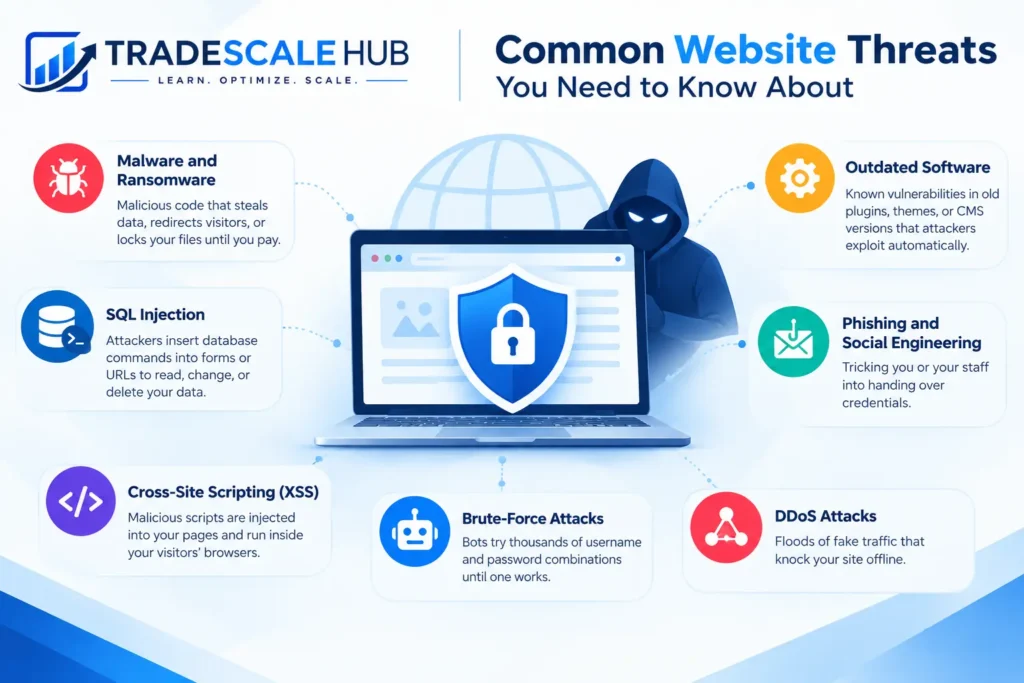
- Malware and ransomware. Malicious code that steals data, redirects visitors, or locks your files until you pay.
- SQL injection. Attackers insert database commands into forms or URLs to read, change, or delete your data.
- Cross-site scripting (XSS). Malicious scripts are injected into your pages and run inside your visitors’ browsers.
- Brute-force attacks. Bots try thousands of username and password combinations until one works.
- DDoS attacks. Floods of fake traffic that knock your site offline.
- Phishing and social engineering. Tricking you or your staff into handing over credentials.
- Outdated software. Known vulnerabilities in old plugins, themes, or CMS versions that attackers exploit automatically.
Notice that most of these attacks succeed because of basic gaps rather than advanced hacking. Knowing these methods makes it easier to see why each step in how to secure a website exists.
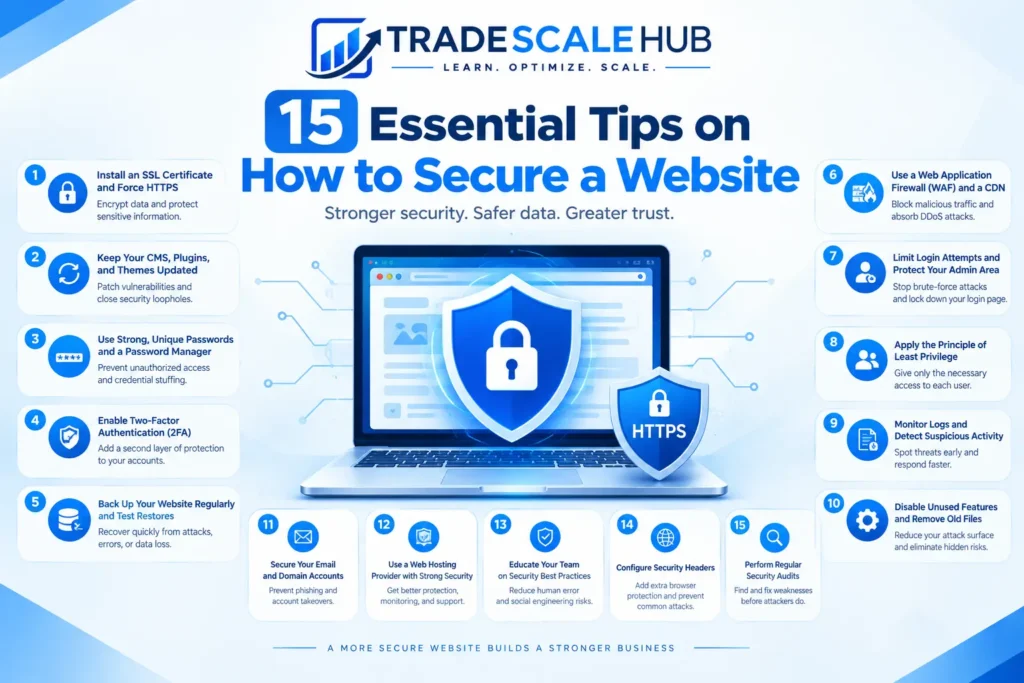
15 Essential Tips on How to Secure a Website
The tips below are ordered roughly by impact. If you only have an hour today, complete the first five, then work through the rest over the following weeks. Each step builds on the others, so the more of them you apply, the harder your site becomes to attack.
1. Install an SSL Certificate and Force HTTPS
An SSL/TLS certificate encrypts the data traveling between your visitors and your server, which protects logins, forms, and payment details from interception. It is the most visible answer to how to secure a website, because browsers label sites without it as “Not secure.”
Most hosts offer free certificates through Let’s Encrypt. After installing yours, redirect all HTTP traffic to HTTPS, update internal links, and enable HSTS so browsers always use the secure version. HTTPS is the first checkbox in any beginner’s guide to how to secure a website, and it also gives you a small ranking benefit.
2. Keep Your CMS, Plugins, and Themes Updated
Outdated software is the number one entry point for attackers. When a vulnerability is discovered, a patch is released, and criminals immediately scan for sites that have not applied it. If you want to know how to secure a website quickly, start by updating everything.
Turn on automatic updates for minor releases and security patches where possible. For major updates, test on a staging copy first. This habit is central to any good website maintenance checklist, which we recommend running monthly. Do not forget server software such as PHP, because an unsupported version leaves known holes open even when your plugins are current. Updating is the cheapest part of how to secure a website, since it costs nothing but a few minutes.
3. Use Strong, Unique Passwords and a Password Manager
Weak and reused passwords are behind a huge share of breaches. One of the simplest rules for how to secure a website is to give every account its own long password, at least 14 characters, built from random words or characters.
A password manager such as Bitwarden or 1Password generates and stores these for you, so nobody has to memorize them. Apply the rule to everything: CMS admin, hosting panel, FTP, database, domain registrar, and email. Never share passwords over chat or email. Use the manager’s sharing feature instead, and change any password immediately when a team member leaves.
4. Enable Two-Factor Authentication (2FA)
Even a strong password can be phished. Two-factor authentication adds a second check, usually a code from an authenticator app, so a stolen password alone is useless. Any serious plan for how to secure a website includes 2FA on admin logins, hosting, and domain accounts.
Prefer authenticator apps or hardware keys over SMS codes, which can be intercepted through SIM swapping. Save your backup codes somewhere safe, and require 2FA for every user who can edit content or change settings. Many security plugins and hosting dashboards let you switch it on in a few minutes.
5. Back Up Your Website Regularly and Test Restores
No defense is perfect, so backups are your safety net. If the worst happens, a clean backup lets you roll back in minutes instead of rebuilding from scratch. Backups are an essential part of how to secure a website because they limit the damage of ransomware, failed updates, and human error.
Follow the 3-2-1 rule: keep three copies of your data, on two different types of storage, with one copy offsite. Automate daily backups for busy sites and weekly backups for static ones, store them away from your hosting account, and test a restore at least twice a year. A backup you have never tested is only a hope. The WordPress website setup guide on IFFARIS also covers security and backups if you use WordPress. Think of backups as insurance in how to secure a website: you hope never to use them, but you will be glad they exist.
6. Use a Web Application Firewall (WAF) and a CDN
A web application firewall sits between your visitors and your site, filtering out malicious requests such as SQL injection, XSS attempts, and bad bots before they reach your server. Adding one is among the most effective steps in how to secure a website without touching its code.
Cloud-based options like Cloudflare, Sucuri, or Wordfence provide firewall rules, bot protection, and DDoS mitigation. A content delivery network also hides your origin server’s address and absorbs traffic spikes, and it speeds up delivery as a bonus. Start with the default rules, choose a service that supports rate limiting, and review the logs monthly. A firewall is the layer most beginners overlook when asking how to secure a website.
7. Limit Login Attempts and Protect Your Admin Area
Brute-force bots hammer login pages around the clock. Limiting failed attempts, for example locking an IP address for 30 minutes after five failures, stops most of them cold. Learning how to secure a website’s login page is one of the quickest wins you can get.
Also rename or hide default admin URLs such as /wp-admin where your setup allows, restrict admin access by IP address if your team works from fixed locations, and add a CAPTCHA to login and contact forms. Never use “admin” as a username, because it hands attackers half of the credentials they need.
8. Apply the Principle of Least Privilege
Not everyone needs administrator access. The principle of least privilege means each user gets only the permissions required to do their job. A writer needs the editor role, not full admin control. This principle is central to how to secure a website with several contributors, because every extra admin account is another target.
Audit your user list quarterly, delete accounts that are no longer needed, and remove access for former employees and freelancers the same day they leave. Use separate accounts for daily work and administration, and avoid sharing logins between people.
9. Choose a Secure Hosting Provider
Your host is the foundation of your security. Cheap shared hosting often means weak isolation, slow patching, and little monitoring. When deciding how to secure a website for the long term, pick a provider that offers server-level firewalls, malware scanning, automatic backups, isolated accounts, and a current PHP version.
Managed WordPress hosting, VPS, and cloud hosting generally give you more control and better protection than the cheapest shared plans. Check the provider’s uptime record, support quality, and how quickly it responds to incidents. Hosting choices matter just as much for how to secure a website built on a hosted platform, so if you are still choosing a platform, our overview of the website builder is a useful starting point.
10. Validate Input and Secure Forms and File Uploads
Every form, search box, and upload field is a doorway into your site. Attackers use them to inject code or upload malicious files. Anyone who wants to know how to secure a website that collects data must treat all user input as untrusted.
Validate and sanitize input on the server, not only in the browser. Use prepared statements to prevent SQL injection, escape output to stop XSS, and limit uploads by file type and size. Store uploaded files outside the web root where possible, and rename them on upload. If you use a CMS, rely on well-maintained form plugins instead of custom code you cannot audit.
11. Add HTTP Security Headers
HTTP security headers tell browsers how to treat your content and block entire classes of attack. Setting them is a small change with a large payoff, and it is a smart addition to any plan for how to secure a website.
Useful headers include Content-Security-Policy to control which scripts may run, X-Frame-Options to prevent clickjacking, X-Content-Type-Options to stop MIME sniffing, Referrer-Policy to limit data leakage, and Strict-Transport-Security to enforce HTTPS. Free tools such as SecurityHeaders.com grade your configuration, and most hosts or plugins let you add the headers without editing server files.
12. Scan for Malware and Monitor Your Site
You cannot fix what you do not see. Many infections run silently for weeks, sending spam or stealing data. Continuous monitoring is a vital part of how to secure a website, because early detection turns a disaster into a quick cleanup.
Run automated malware scans weekly, enable file-change monitoring, and set up uptime alerts. Connect your site to Google Search Console so Google can notify you about security issues and manual actions. Our Google Search Console guide shows how to get started. Also review your server and access logs for odd spikes in traffic or failed logins.
13. Remove Unused Plugins, Themes, and Files
Every plugin, theme, and script you install adds code that can break or be exploited, even when it is deactivated. Deleting what you do not use shrinks your attack surface and is a cheap step in how to secure a website.
Delete inactive themes, abandoned plugins, old staging folders, and forgotten test pages. Install extensions only from reputable sources, check when they were last updated, and read reviews before adding them. Never use “nulled” or pirated premium plugins, which are frequently loaded with backdoors. For guidance on choosing extensions wisely, see IFFARIS’s article on how to choose the right WordPress plugins.
14. Set Correct File Permissions and Protect Sensitive Files
Incorrect file permissions let attackers read or modify files they should never touch. Setting them properly is a technical but important part of how to secure a website. As a general rule, files should be set to 644 and folders to 755, while sensitive configuration files such as wp-config.php should be stricter, for example 600 or 640 depending on your host.
Disable directory listing, block access to backup and log files, and keep configuration files above the public web root when possible. Disable file editing in the dashboard so an attacker with admin access cannot inject code. A note on robots.txt: it only gives crawlers instructions and does not protect anything, so never rely on it to hide private files. IFFARIS explains what it can and cannot do in its robots.txt SEO guide.
15. Train Your Team and Prepare an Incident Response Plan
Technology alone cannot stop human error. Phishing emails, fake invoices, and urgent “password reset” messages trick even careful people. Teaching your team how to secure a website and its accounts turns every employee into a line of defense rather than a weak link.
Run short training sessions twice a year, cover phishing red flags, and explain why your password rules exist. Then write a simple incident response plan: who to call, how to take the site offline, where the clean backups are, how to reset every credential, and how to notify customers if their data is involved. Practice it once, so that panic does not set the pace during a real attack.
Quick Checklist: How to Secure a Website in One Afternoon
If you want a fast starting point on how to secure a website, work through this list today:
- Install SSL and redirect all pages to HTTPS
- Update your CMS, plugins, themes, and PHP version
- Change weak passwords and install a password manager
- Turn on two-factor authentication for every admin account
- Set up automated, offsite backups
- Activate a firewall and login-attempt limits
- Delete unused plugins, themes, and user accounts
- Run a malware scan and set up uptime alerts
These eight actions cover the most common attack paths. Once they are done, move on to the remaining tips at your own pace.
Common Mistakes to Avoid When Learning How to Secure a Website
Even well-meaning site owners slip up. Avoid these frequent errors as you apply the steps in this guide:
- Assuming you are too small to be a target. Automated attacks do not discriminate, and small sites are often easier to breach.
- Delaying updates. “I’ll do it later” is how many compromised sites got compromised.
- Relying on one plugin. A security plugin helps, but it cannot replace backups, strong passwords, and good hosting.
- Reusing passwords. One leaked password from another service can open your admin panel.
- Skipping backup tests. Corrupted or incomplete backups are discovered too late.
- Ignoring staff access. Accounts of former contractors often stay active for years.
- Treating security as a one-time project. Threats evolve, so your protection must too.
Remember that how to secure a website is an ongoing practice rather than a single task. Build the steps above into your monthly routine, and you will avoid most of these pitfalls.
Securing a WordPress Website
WordPress powers a large share of the web, which makes it a favorite target. The core principles of how to secure a website apply equally here, but a few WordPress-specific steps add extra protection:
- Use a reputable security plugin such as Wordfence, Sucuri, or Solid Security
- Replace the default “admin” username
- Disable XML-RPC if you do not use it
- Disable the built-in file editor by adding
define('DISALLOW_FILE_EDIT', true);to wp-config.php - Change the default database table prefix on new installs
- Choose well-coded, regularly updated themes
If you are building or redesigning your site, a solid WordPress website design process includes security from day one, and our overview of the WordPress website basics explains the platform choices. Slow, bloated sites are often neglected sites too, so check these WordPress website speed tips as part of your routine. Whenever you are unsure how to secure a website built on WordPress, start with updates, backups, and 2FA before adding more plugins.
How Website Security Affects SEO
Search engines want to send users to safe pages. A compromised site can trigger browser warnings, spammy injected links, and cloaked pages, all of which lead to ranking drops or even deindexing. Even a clean site benefits from good security: HTTPS is a lightweight ranking signal, and a stable, fast site keeps visitors engaged. That is why knowing how to secure a website belongs inside every technical SEO strategy.
Include a security review in every audit. Our SEO audit checklist and the technical SEO checklist from IFFARIS are good places to add security checks next to crawlability and indexing tasks. Treat every hour you spend learning how to secure a website as an investment that protects your whole SEO budget.
What to Do If Your Website Is Hacked
Even with the best preparation, incidents happen. If you suspect a breach, stay calm and follow this order:
- Put the site in maintenance mode or take it offline to protect visitors.
- Change all passwords: CMS, hosting, FTP, database, and email.
- Scan the site to identify infected files and the entry point.
- Restore a clean backup from before the infection, or remove the malicious code and rebuild affected files.
- Update everything and close the vulnerability that was used.
- Request a review from Google if your site was flagged.
- Notify affected users if personal data was exposed, as local law may require.
If you cannot find the cause, hire a professional cleanup service. Afterward, review the 15 tips above and ask which one would have prevented the attack. Every incident is a lesson in how to secure a website more effectively next time, and the best recovery plan is to apply that lesson immediately.
How Often Should You Review Your Website Security?
Security is a habit, not a milestone. A simple rhythm keeps you ahead: weekly malware scans and update checks, monthly backup tests and log reviews, quarterly user-access audits and password refreshes, and a full security review twice a year. Treat this routine as the long-term answer to how to secure a website without feeling overwhelmed.
Put the tasks on a calendar and assign an owner for each one. Consistency matters more than perfection. For a deeper look at day-to-day protection, read our website security resource and keep your maintenance checklist handy.
Frequently Asked Questions About How to Secure a Website
What is the most important step in how to secure a website?
Keeping software updated and protecting every login with strong passwords and two-factor authentication prevents the majority of attacks. If you can only do two things today, do those.
Can I learn how to secure a website without coding skills?
Yes. Most protections, such as SSL, backups, 2FA, firewalls, and updates, can be configured through your hosting dashboard or a reputable plugin. You only need a developer for advanced tasks like custom security headers or server hardening.
How much does it cost to secure a website?
Many of the most effective steps are free, including updates, strong passwords, 2FA, and Let’s Encrypt SSL. Premium firewalls and monitoring typically cost from a few dollars to a few hundred dollars per month depending on your site, so how to secure a website can fit almost any budget.
Do small websites really need security?
Absolutely. Bots target vulnerabilities, not brand names, and small sites often have the weakest protection. Every owner should learn how to secure a website regardless of its size or traffic.
Is HTTPS enough to protect my website?
No. HTTPS only encrypts data in transit. It does not stop malware, brute-force attacks, or vulnerable plugins. It is one piece of a layered strategy for how to secure a website.
Final Thoughts on How to Secure a Website
You now know how to secure a website using 15 practical steps: SSL, updates, strong passwords, 2FA, backups, firewalls, login protection, least privilege, secure hosting, input validation, security headers, monitoring, clean-up, correct permissions, and team training. You do not need to do everything in one day. Start with the five highest-impact actions, schedule the rest, and keep reviewing. The sites that stay safe are not the ones with the most expensive tools; they are the ones with consistent habits.
Mastering how to secure a website is one of the best investments you can make in your business, because it protects your revenue, your rankings, and your customers’ trust. Bookmark this guide, share it with anyone who manages your site, and start today. The best time to learn how to secure a website was before an attack, and the second best time is right now.
