
If your pages take too long to load, you are losing visitors, leads, and rankings every single day. Learning how to improve website speed is no longer optional for any business that depends on its website for traffic and conversions — it is one of the most important technical priorities a site owner can tackle. In this guide, we will walk through exactly how to improve website speed using proven, step-by-step techniques that work for blogs, local service websites, and eCommerce stores alike.
Whether you run a small business site, manage content for a growing brand, or you are simply frustrated with a slow-loading homepage, this guide will show you how to improve website speed in a way that is practical, sustainable, and aligned with what Google actually rewards in search rankings.
Speed is also one of the few technical SEO factors you can improve without touching your content strategy at all. You do not need new keywords, new backlinks, or a redesign to see results — often, the biggest gains come from server-level and code-level changes that a visitor never consciously notices, except in how quickly the page appears in front of them.
Why Learning How to Improve Website Speed Matters
Before we get into the tactics, it helps to understand why so many site owners are searching for how to improve website speed in the first place.
1. Google uses speed as a ranking factor. Page experience signals, including Core Web Vitals, directly influence how your pages rank in search results. Sites that figure out how to improve website speed tend to outperform slower competitors in the same niche.
2. Visitors abandon slow pages. Studies on user behavior consistently show that bounce rates climb sharply once load time crosses just a few seconds. If you want to keep visitors on the page long enough to read your content or fill out a contact form, you need to know how to improve website speed and apply it consistently.
3. Speed affects conversions directly. For local service businesses — electricians, appliance repair companies, towing services — a slow website can mean a lost phone call. Every second of delay is a second closer to a visitor clicking the back button and calling a competitor instead. This is exactly why learning how to improve website speed should sit near the top of any local business owner’s SEO checklist.
4. Mobile users are especially sensitive to slow load times. With most traffic now coming from phones, how to improve website speed on mobile networks has become just as important as desktop performance.
5. Paid advertising costs more on slow sites. If you run Google Ads, landing page speed feeds directly into your Quality Score. Advertisers who invest time in how to improve website speed often see lower cost-per-click as a direct result, on top of the organic ranking benefits.
6. Crawl budget is affected by speed. Search engine crawlers can index more of your site in the same amount of time when pages load quickly. Large sites with hundreds of pages have an added incentive to learn how to improve website speed, since faster servers allow bots to crawl and refresh more pages during each visit.
How to Test Website Speed Before You Improve It
You cannot fix what you do not measure. Before applying any of the techniques below, run your site through a speed-testing tool so you have a baseline to compare against once you start working on how to improve website speed.
- Google PageSpeed Insights — shows both lab and real-world (field) data, plus a breakdown of Core Web Vitals.
- GTmetrix — provides a waterfall chart so you can see exactly which resources are slowing your pages down.
- Google Search Console — the Core Web Vitals report flags which pages need attention across your entire site.
- Pingdom Tools — useful for testing load times from different global locations.
Once you have your baseline numbers, you can revisit them after each change to confirm that your efforts to improve website speed are actually working.
It also helps to test from more than one location and on more than one device. A page that loads quickly on a fast office connection can still feel sluggish on a mid-range phone over mobile data, so any serious attempt at how to improve website speed should include real-world mobile testing, not just desktop lab scores.
How to Improve Website Speed: Step-by-Step Strategies
Now let’s get into the actual techniques. Each of the sections below tackles a different piece of the puzzle, and together they form a complete roadmap for how to improve website speed on any platform, including WordPress, which powers a large share of local business and content websites.
1. Choose Fast, Reliable Hosting
Hosting is the foundation of website performance, so it is always the first place to look when figuring out how to improve website speed. Shared hosting plans often place hundreds of sites on the same server, which slows everyone down during traffic spikes. Upgrading to managed WordPress hosting, a VPS, or a cloud hosting provider is frequently the single biggest lever for how to improve website speed, especially for sites that have outgrown their original budget hosting plan.
Server location matters too. If most of your customers are in the UAE or the US, hosting your site on a server physically close to that audience (or pairing budget hosting with a strong CDN) will do more for how to improve website speed than almost any plugin. Before spending money on optimization tools, it is worth confirming your hosting plan actually has enough server resources — CPU, RAM, and concurrent process limits — for your traffic level, since undersized hosting quietly limits every other effort to improve website speed.
2. Enable Browser Caching and Page Caching
Caching stores a version of your page so repeat visitors do not have to reload every resource from scratch. This is one of the fastest wins available when you are learning how to improve website speed. Plugins like WP Rocket, W3 Total Cache, or LiteSpeed Cache (if your host supports it) can dramatically cut load times with minimal setup, making them a go-to first step for how to improve website speed on WordPress.
3. Use a Content Delivery Network (CDN)
A CDN distributes copies of your site across servers around the world, so visitors load your pages from a location physically closer to them. For businesses serving customers across multiple cities or regions, a CDN is essential to how to improve website speed for every visitor, not just the ones near your origin server. Cloudflare, BunnyCDN, and StackPath are common choices.
4. Optimize and Compress Images
Unoptimized images are one of the most common culprits behind slow-loading pages, which makes image optimization central to any plan for how to improve website speed. Convert images to modern formats like WebP or AVIF, compress them before uploading, and always specify width and height attributes to prevent layout shifts. Plugins such as ShortPixel or Imagify automate much of this work, which is a practical way to improve website speed without manually editing every file.
5. Minify CSS, JavaScript, and HTML
Every unnecessary character, space, and comment in your code adds to page weight. Minifying these files is a technical but highly effective way to improve website speed, since smaller files download and parse faster. Most caching plugins include a minification option, so this step often overlaps with step two when you improve website speed.
6. Reduce HTTP Requests
Every image, script, and stylesheet on a page requires a separate request to the server. Combining files, using CSS sprites where appropriate, and removing unused plugins or widgets are all practical ways to reduce these requests. Fewer requests means fewer round trips, which is a direct answer to how to improve website speed on pages with a lot of visual elements.
A typical service page with a hero image, a photo gallery, a contact form plugin, a chat widget, and several tracking scripts can easily generate 60 to 100 individual requests. Auditing that list one item at a time — asking whether each script actually earns its place — is tedious but effective, and it is a step many site owners skip entirely when they first start working on how to improve website speed.
7. Enable GZIP or Brotli Compression
Server-side compression shrinks the size of files before they are sent to the browser, then unpacks them on arrival. This is a low-effort, high-impact technique for how to improve website speed, and most modern hosts and CDNs support it with a single toggle in the control panel.
8. Optimize Your Database
Over time, WordPress databases accumulate post revisions, spam comments, and transient data that slow down queries. Cleaning your database regularly — using a plugin like WP-Optimize or running manual queries — is an often-overlooked way to improve website speed, particularly for sites with years of published content.
Sites that publish daily, as many SEO content sites do, tend to build up post revisions the fastest. Limiting the number of revisions WordPress stores, clearing expired transients, and optimizing database tables on a monthly schedule keeps queries fast and is a simple habit that supports every other effort to improve website speed elsewhere on the site.
9. Limit and Optimize Plugins
Every plugin adds extra code that has to load on each page request. Auditing your plugin list and removing anything redundant or outdated is a simple but effective way to improve website speed. When you are deciding how to improve website speed on a plugin-heavy WordPress install, start by deactivating anything you have not used in the last six months.
10. Implement Lazy Loading
Lazy loading delays the loading of images and videos below the fold until a visitor actually scrolls to them. This reduces the initial page weight significantly and is one of the easiest wins for how to improve website speed on image-heavy pages like portfolios, galleries, or service pages with lots of before-and-after photos.
11. Upgrade Your PHP Version
Running an outdated PHP version can slow down every dynamic request on your site. Upgrading to the latest stable PHP release (through your hosting dashboard) is a quick, often free way to improve website speed, sometimes cutting server response times dramatically with zero design changes required.
12. Reduce Redirect Chains
Each redirect adds an extra round trip between the browser and the server. Auditing your site for redirect chains — especially old 301 redirects stacked on top of each other — is a technical but worthwhile step in how to improve website speed, particularly on older sites that have changed URLs multiple times.
13. Optimize for Core Web Vitals
Google’s Core Web Vitals — Largest Contentful Paint (LCP), Cumulative Layout Shift (CLS), and Interaction to Next Paint (INP) — are specific, measurable signals tied directly to page experience. Addressing each of these metrics individually is one of the most results-driven ways to improve website speed, because it targets exactly what Google measures when evaluating your pages.
LCP measures how long the largest visible element takes to load, so improving hosting, images, and render-blocking scripts (steps 1, 4, and 5 above) directly moves this number. CLS measures unexpected layout shifts, which usually come from images or ads loading without reserved space — fixing this is less about how to improve website speed in raw load time and more about making the experience feel stable while it loads. INP measures how quickly a page responds to a click or tap, which ties back to reducing heavy JavaScript and unnecessary plugins. Treating these three metrics as separate mini-projects, rather than one vague “speed” goal, makes the overall task of how to improve website speed far more manageable.
14. Prioritize Mobile Website Speed
Since most searches now happen on mobile devices, how to improve website speed on mobile deserves its own checklist: use responsive images, avoid heavy pop-ups, minimize third-party scripts, and test on an actual mid-range phone rather than only a desktop browser. Mobile-first performance is central to any modern plan to improve website speed.
15. Use a Lightweight, Well-Coded Theme
Some themes, especially page-builder-heavy or multipurpose themes, load large amounts of unused CSS and JavaScript on every page. Switching to a lightweight, purpose-built theme — or trimming down the features you are not actually using in your current one — is a structural way to improve website speed that pays off on every single page of your site, not just the ones you optimize by hand.
16. Monitor and Maintain Speed Regularly
Improving website speed is not a one-time project. New plugins, theme updates, and added content can all reintroduce slowdowns. Set a recurring monthly check using the tools mentioned earlier so you always know where you stand and can act quickly if speed starts to drop again.
Common Mistakes That Undo Your Efforts to Improve Website Speed
Even site owners who understand how to improve website speed in theory often make mistakes that quietly cancel out their progress. Watch for these:
- Installing a caching plugin but never clearing the cache after updates. Stale cache can serve outdated, broken versions of pages, which defeats the purpose of trying to improve website speed in the first place.
- Uploading full-resolution images “just this once.” A single 5MB hero image can undo weeks of careful optimization work aimed at how to improve website speed.
- Adding third-party scripts without auditing them. Chat widgets, tracking pixels, and social embeds are common, overlooked culprits. Reviewing them regularly is an easy way to improve website speed that many site owners skip.
- Choosing a visually heavy theme without checking performance benchmarks first. Some page builders generate bloated code by default, making it harder to improve website speed no matter how many plugins you add later.
- Treating speed as a launch-day task instead of an ongoing habit. As covered above, how to improve website speed is really a maintenance question, not a one-time checklist.
How to Improve Website Speed for E-commerce and Local Service Websites
The exact priorities for how to improve website speed shift slightly depending on the type of site you run.
E-commerce sites typically carry more images, more scripts (for carts, reviews, and payment processors), and more dynamic content than a simple business site. For online stores, how to improve website speed usually starts with aggressive image compression, lazy loading on product grids, and trimming unnecessary third-party apps that slow down checkout pages. Even a one-second delay at checkout can measurably reduce completed orders, which makes speed a direct revenue issue rather than a purely technical one. Product category pages, which often load dozens of thumbnails at once, deserve particular attention, since they tend to be the heaviest pages on the entire site.
Local service websites — electricians, appliance repair technicians, towing companies, HVAC contractors — tend to have simpler page structures, which means how to improve website speed is often more achievable in a single focused session. The priority here is usually hosting quality, image optimization on service and gallery pages, and making sure contact forms and click-to-call buttons load instantly, since these are the elements that turn a fast page into an actual booked job.
In both cases, the underlying techniques for how to improve website speed are the same sixteen strategies covered above — only the priority order changes based on what your site actually does. A quick way to decide where to start is to run a speed test on your two or three most-visited pages and fix whatever the report flags as the largest opportunity first, rather than trying to optimize the entire site at once.
How Website Speed Impacts Local Service Businesses
For local service businesses — electricians, appliance repair companies, HVAC technicians, towing services — understanding how to improve website speed is directly tied to revenue. Most of these searches happen in moments of urgency, and a visitor who cannot get a page to load will simply call the next business in the results. If a technical SEO check on your site’s speed already flags slow load times, prioritizing the fixes above should be treated as urgent, not optional. Pairing a faster website with strong Google Business Profile optimization gives local businesses the best chance of converting search traffic into phone calls and booked jobs.
It is also worth connecting website speed improvements to your broader Core Web Vitals strategy, since these metrics influence both rankings and the day-to-day experience of the customers landing on your service pages. If you have not reviewed your on-page SEO recently, now is a good time to combine that work with your speed optimization efforts for a compounding effect on rankings.
For a broader look at how site performance fits into a full SEO strategy, our sister publication has a dedicated guide to WordPress website speed, as well as a technical SEO checklist that covers speed alongside crawlability and indexing.
Frequently Asked Questions About How to Improve Website Speed
How long should it take to improve website speed after making changes? Most caching, compression, and image optimization changes take effect immediately. However, Google’s field data (used in Search Console) can take up to 28 days to fully reflect improvements, since it is based on a rolling average of real user visits.
What is the fastest way to improve website speed on WordPress? Installing a quality caching plugin and compressing your images are usually the two fastest wins. Together, they can solve a large share of the problem for site owners wondering how to improve website speed without a full redesign.
Does improving website speed actually help SEO rankings? Yes. Page experience signals, including Core Web Vitals, are part of Google’s ranking systems. Learning how to improve website speed is one of the more measurable, controllable technical SEO improvements available to any site owner.
How often should I check my website speed? A monthly check is a reasonable baseline for most small business sites, though sites that publish content frequently or run regular promotions should test more often to catch regressions early.
Can a slow website really cost a local business customers? Yes. For urgent, local searches — think appliance repair or towing — a slow page often means a lost call. This is one of the strongest business cases for prioritizing how to improve website speed on any local service website.
Is a fast website more important than good content? They work together rather than competing. Great content on a slow page still loses visitors before they ever read it, which is why how to improve website speed should be handled alongside, not instead of, strong on-page content.
Do I need a developer to improve website speed? Not always. Many of the steps above — caching plugins, image compression tools, and hosting upgrades — can be handled without code. More advanced steps, like fixing render-blocking scripts, are where bringing in a developer to help improve website speed starts to pay off.
Will improving website speed break my site’s design? Done carefully, no. Most caching and compression tools are non-destructive and reversible, so you can test changes on a staging site first if you want extra confidence before rolling out speed improvements on your live pages.
Final Thoughts on How to Improve Website Speed
There is no single fix that solves everything at once. Real, lasting results come from working through hosting, caching, images, code, and Core Web Vitals systematically rather than chasing one trick at a time. If you take away one thing from this guide, let it be this: how to improve website speed is a process, not a one-time task, and the sites that treat it that way are the ones that stay fast, rank well, and keep converting visitors into customers over the long run.
Start with the highest-impact items — hosting, caching, and image optimization — then work down the list. Revisit your numbers monthly, and you will have a durable answer to how to improve website speed that keeps paying off for years, not just for one audit cycle.
Quick Checklist: How to Improve Website Speed
Use this as a fast reference the next time you sit down to work on performance:
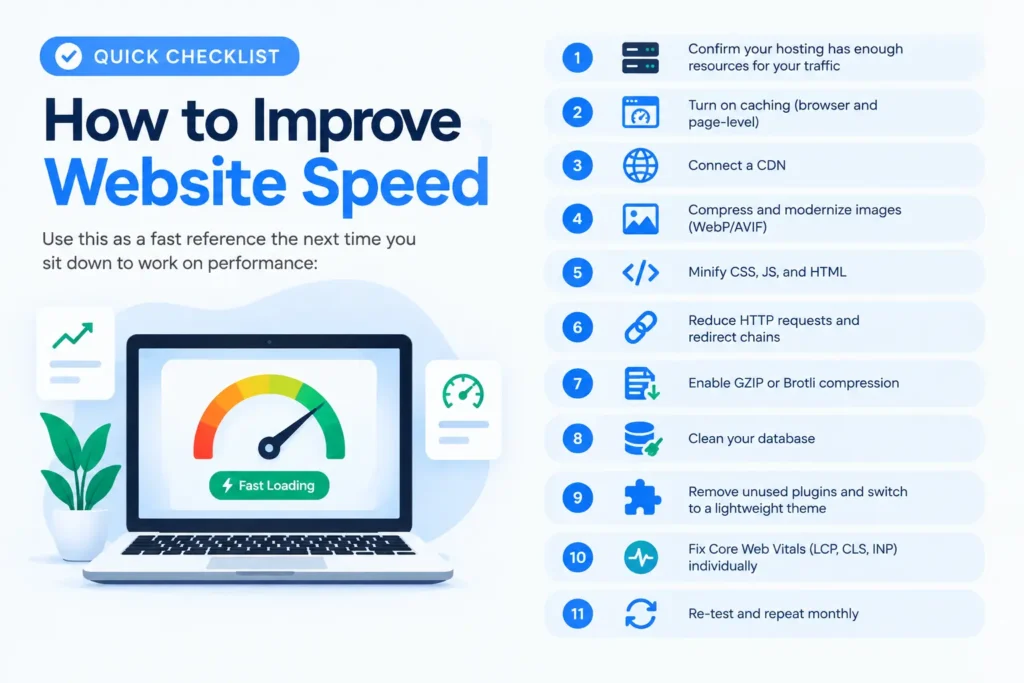
- Confirm your hosting has enough resources for your traffic
- Turn on caching (browser and page-level)
- Connect a CDN
- Compress and modernize images (WebP/AVIF)
- Minify CSS, JS, and HTML
- Reduce HTTP requests and redirect chains
- Enable GZIP or Brotli compression
- Clean your database
- Remove unused plugins and switch to a lightweight theme
- Fix Core Web Vitals (LCP, CLS, INP) individually
- Re-test and repeat monthly
Working through this list is, in practice, the complete answer to how to improve website speed for most small business and content websites. Print it, save it, or bookmark this guide, and return to it every time you publish a major update to your site — a five-minute review after each change is usually enough to catch a new slowdown before it costs you rankings or customers.
