
Building a website used to mean hiring a developer, learning HTML and CSS, or paying thousands of dollars for a custom design. Today, a website builder can get a business online in an afternoon, without a single line of code. Whether you run a local trade business, an online store, or a personal blog, a website builder is often the fastest and most affordable path to a professional web presence.
But not every platform in this category is built the same way, and picking the wrong one can cost you time, money, and search visibility down the road. In this guide, we’ll break down exactly what a website builder is, how it works, the different types available, the features that actually matter, and a step-by-step framework for choosing the right option for your specific needs.
By the end, you should have a clear picture of whether a drag-and-drop tool, an AI-assisted platform, or a CMS-based approach makes the most sense for the site you’re planning to launch — and what to check before you commit money or time to any single provider.
It’s also worth noting that this decision doesn’t have to be permanent. Plenty of businesses start with the simplest option available, prove the concept works, and migrate to something more advanced once traffic and revenue justify the extra investment. Treating your first choice as a starting point rather than a lifetime commitment can take a lot of the pressure off the decision.
What Is a Website Builder?
A website builder is a software platform that lets people design, build, and publish a website without writing custom code. Instead of hiring a developer or learning to program, users work inside a visual interface — usually a drag-and-drop editor — to arrange text, images, buttons, and layout sections into finished pages.
Most of these platforms are hosted solutions, meaning the company that owns the software also hosts your website on its servers. That’s different from traditional web development, where you’d need to buy hosting separately, install a content management system, and manage updates yourself. With a website builder, hosting, security patches, and server maintenance are typically handled for you behind the scenes.
The appeal here is accessibility. Small business owners, freelancers, and solo entrepreneurs can launch a working site without technical skills or a large upfront budget. At the same time, more advanced platforms in this space now offer enough flexibility for agencies and developers to build client sites efficiently, which is why the category has grown far beyond simple templates into a genuine alternative to custom development for many use cases.
How Does a Website Builder Work?
Every platform in this space follows a similar basic workflow, even though the interface and feature set vary from one provider to another. Understanding this workflow helps explain why a website builder can be so much faster than traditional development.
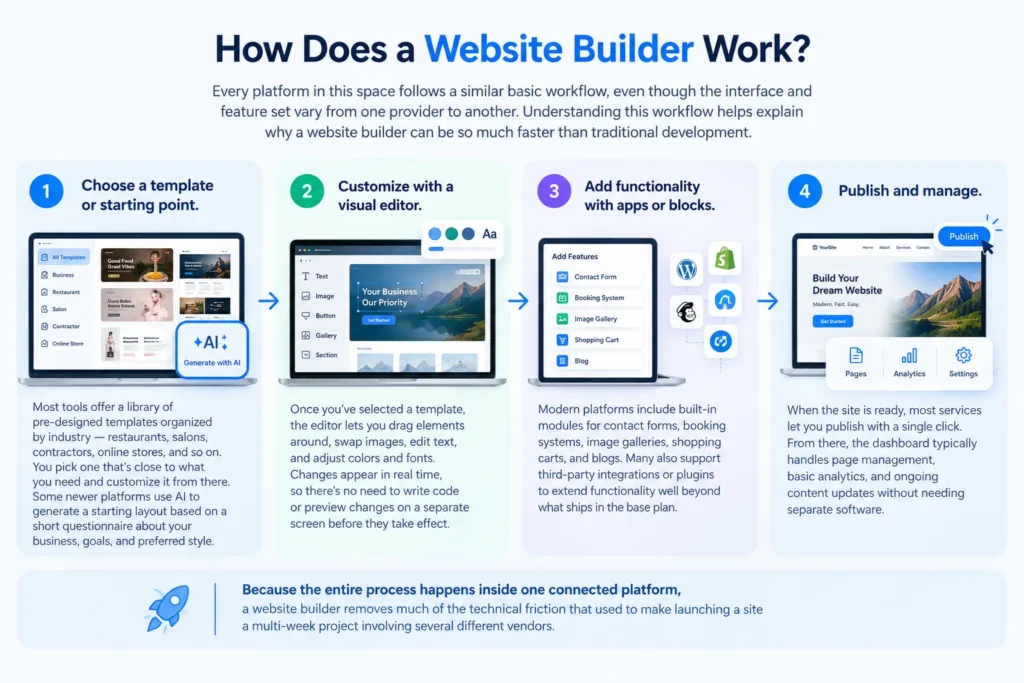
- Choose a template or starting point. Most tools offer a library of pre-designed templates organized by industry — restaurants, salons, contractors, online stores, and so on. You pick one that’s close to what you need and customize it from there. Some newer platforms use AI to generate a starting layout based on a short questionnaire about your business, goals, and preferred style.
- Customize with a visual editor. Once you’ve selected a template, the editor lets you drag elements around, swap images, edit text, and adjust colors and fonts. Changes appear in real time, so there’s no need to write code or preview changes on a separate screen before they take effect.
- Add functionality with apps or blocks. Modern platforms include built-in modules for contact forms, booking systems, image galleries, shopping carts, and blogs. Many also support third-party integrations or plugins to extend functionality well beyond what ships in the base plan.
- Publish and manage. When the site is ready, most services let you publish with a single click. From there, the dashboard typically handles page management, basic analytics, and ongoing content updates without needing separate software.
Because the entire process happens inside one connected platform, a website builder removes much of the technical friction that used to make launching a site a multi-week project involving several different vendors.
Types of Website Builders
Not every platform in this category serves the same purpose. Understanding the main categories of website builder tools will help you match your choice to your actual goals rather than picking whichever option is most heavily advertised.
Drag-and-Drop Builders
This is the most common type of website builder. Users build pages visually by dragging text boxes, images, and sections onto a canvas. These platforms prioritize ease of use and design flexibility, making them a good fit for small businesses, portfolios, and service sites that need a custom look without custom code.
AI-Powered Builders
A newer category uses artificial intelligence to generate a complete site layout, and sometimes even written copy, based on a short brief. You answer a few questions about your business, industry, and goals, and the software produces a starting design you can then refine. This approach is especially useful for people who want a fast first draft before spending time on fine details.
eCommerce-Focused Builders
Some platforms are built specifically around online selling. They include product catalogs, shopping carts, payment gateway integrations, inventory tracking, and shipping calculators out of the box. If the main goal is running an online store, a builder designed for eCommerce will usually outperform a general-purpose website builder in that specific area.
CMS-Based Builders
This type is built on top of a content management system, most commonly WordPress. A CMS-based website builder gives you a visual page editor while still allowing access to the underlying code, themes, and plugin ecosystem. It sits between simple drag-and-drop tools and fully custom development, offering more control at the cost of a slightly steeper learning curve.
Industry-Specific Builders
A smaller category targets a single niche — real estate agents, restaurants, photographers, or local service contractors, for example. These platforms bundle features that matter most to that industry, such as menu displays for restaurants or booking calendars for service businesses, directly into the core product.
Key Features to Look For
Choosing a website builder isn’t just about picking the platform with the nicest templates. The features below determine whether the tool will actually support your business as it grows, rather than becoming something you outgrow within a year.
- Responsive design. Every modern website builder should automatically adapt layouts for mobile, tablet, and desktop screens, since most traffic today comes from mobile devices.
- SEO controls. A good website builder gives you access to meta titles, meta descriptions, URL structures, alt text, and schema markup. Without these controls, even a beautifully designed site can struggle to rank in search results.
- Page speed and performance. Some platforms load slower than others because of bloated code or unnecessary scripts. Since loading speed affects both user experience and search rankings, this is worth testing before committing to any website builder long term.
- eCommerce capability. If you plan to sell products, check whether the platform supports secure checkout, multiple payment methods, and tax calculation out of the box.
- Third-party integrations. A flexible website builder connects easily with email marketing tools, CRMs, analytics platforms, and scheduling software your business already relies on.
- Customer support. Since most users of a website builder aren’t developers, responsive support — live chat, documentation, or phone support — matters when something breaks unexpectedly.
- Scalability. A tool that works for a five-page brochure site might not handle a growing product catalog or a surge in traffic. Check the platform’s limits before you build something you’ll outgrow quickly.
- Ownership and portability. Some platforms make it difficult to export your content or migrate to another host later. Understand these limitations upfront, before your site and content are locked in.
Website Builder vs. Custom Web Development
A common question business owners ask is whether to use a website builder or hire a developer for a fully custom site. Both approaches have a place, depending on budget, timeline, and complexity of the project.
A website builder is typically faster and cheaper. Most sites can go live within days, and monthly plans are often far less expensive than a custom development project handled by a freelancer or agency. For small businesses, service providers, and startups testing an idea, this approach removes a major barrier to getting online quickly.
Custom development, on the other hand, offers more flexibility. When a business has highly specific functionality requirements, unusual design needs, or expects significant scale, custom code may outperform what a template-driven platform can offer out of the box. The tradeoff is cost and time — custom builds typically take weeks or months and require ongoing developer support to maintain.
For most small and mid-sized businesses, a website builder offers the best balance of speed, cost, and capability. It’s only when requirements become genuinely complex — think large-scale marketplaces or highly custom web applications — that custom development becomes the clearer choice over an off-the-shelf platform.
Best Use Cases for a Website Builder
This category of tool fits a wide range of situations, but it tends to shine in a few specific scenarios that come up again and again for small business owners.
- Local service businesses — electricians, plumbers, HVAC technicians, and similar trades can use a website builder to publish service pages, contact information, and booking forms quickly. If you’re setting these up, it’s worth reviewing our guide to service page SEO alongside your setup process.
- Small online stores — entrepreneurs testing a product idea can launch with an eCommerce-focused website builder before investing in a fully custom storefront.
- Portfolios and personal brands — freelancers, consultants, and creatives can showcase work through a simple website builder without needing design skills of their own.
- Landing pages and campaigns — marketers often use these tools to spin up quick landing pages for promotions without waiting on a development team’s availability.
- Nonprofits and community organizations — limited budgets make a website builder an efficient way to maintain an online presence without ongoing developer costs eating into the budget.
SEO Considerations When Using a Website Builder
Search visibility is one of the biggest factors separating a good experience from a frustrating one. A site can look great and still fail to attract organic traffic if the underlying website builder doesn’t support solid SEO fundamentals from the start.
Before committing to a platform, check whether it allows full control over title tags, meta descriptions, header structure, and clean URLs. Some builders auto-generate URLs with unnecessary characters or parameters, which can hurt both usability and rankings over time. A strong website builder should let you edit these elements on every page, not just the homepage.
Page speed is another factor tied directly to SEO performance. Search engines factor loading speed into rankings, so a website builder with heavy, unoptimized code can quietly work against you without any obvious warning sign. It’s worth reviewing our breakdown of Core Web Vitals and website speed and SEO to understand what to test before making a final decision.
Structured data, or schema markup, is increasingly important for local businesses trying to stand out in search results. Not every platform supports this natively, so if local visibility matters to your business, check the schema options available — our guide to local business schema explains why this matters for local search rankings and how it connects to your broader setup.
Finally, think about long-term content strategy. If you plan to publish blog posts, guides, or resource pages regularly, confirm the platform has a real content management system built in, not just a static page editor. A solid SEO strategy depends on being able to consistently add and update content, and a limited website builder can make that harder than it needs to be over time. For a deeper technical breakdown of what to check before launch, Iffaris’s technical SEO checklist is a useful companion resource worth reviewing alongside this guide.
Common Mistakes to Avoid
Even with a capable website builder, certain mistakes can undermine an otherwise solid site and quietly limit its results.
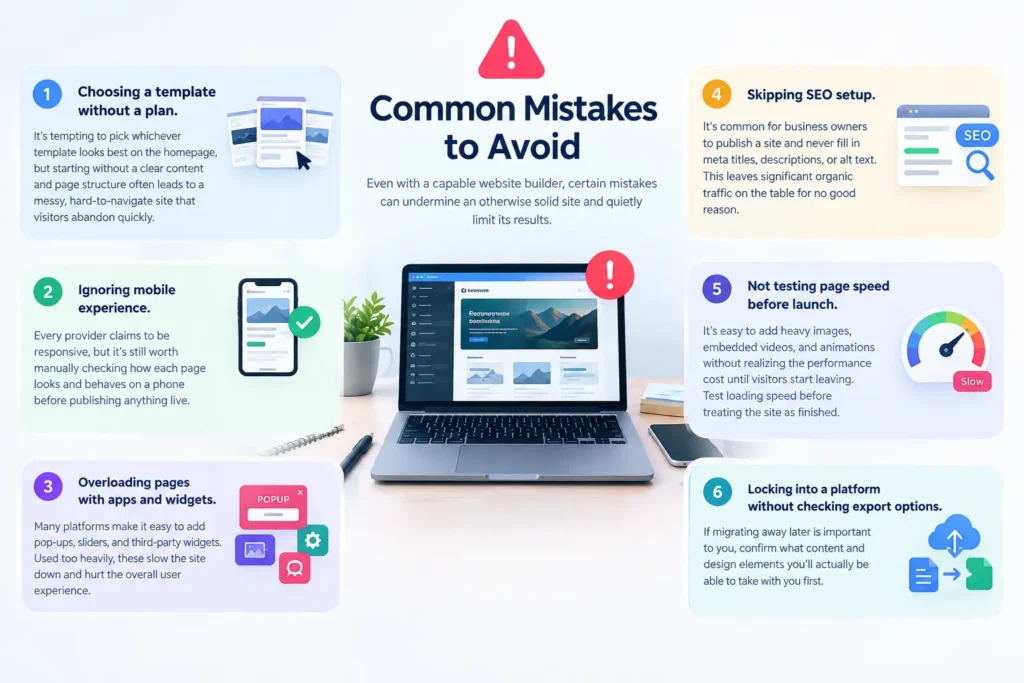
- Choosing a template without a plan. It’s tempting to pick whichever template looks best on the homepage, but starting without a clear content and page structure often leads to a messy, hard-to-navigate site that visitors abandon quickly.
- Ignoring mobile experience. Every provider claims to be responsive, but it’s still worth manually checking how each page looks and behaves on a phone before publishing anything live.
- Overloading pages with apps and widgets. Many platforms make it easy to add pop-ups, sliders, and third-party widgets. Used too heavily, these slow the site down and hurt the overall user experience.
- Skipping SEO setup. It’s common for business owners to publish a site and never fill in meta titles, descriptions, or alt text. This leaves significant organic traffic on the table for no good reason.
- Not testing page speed before launch. It’s easy to add heavy images, embedded videos, and animations without realizing the performance cost until visitors start leaving. Test loading speed before treating the site as finished.
- Locking into a platform without checking export options. If migrating away later is important to you, confirm what content and design elements you’ll actually be able to take with you first.
How to Choose the Right Website Builder
With so many platforms available, choosing a website builder can feel overwhelming. This step-by-step approach simplifies the decision into something manageable.
Step 1: Define your goals. Are you building a simple informational site, an online store, a portfolio, or a booking-driven service site? The right choice depends heavily on what the site needs to accomplish day to day.
Step 2: Set a realistic budget. Pricing for these platforms ranges from free plans with limited features to premium tiers with advanced eCommerce and marketing tools. Decide what you’re willing to spend monthly or annually before comparing options side by side.
Step 3: Test the editor before committing. Most providers offer a free trial or free tier. Spend time actually building a sample page to see whether the interface feels intuitive for your own skill level and comfort with technology.
Step 4: Check SEO and performance controls. As covered above, not every platform gives equal access to the technical elements that affect search visibility. Confirm this before signing up for a paid plan you might regret.
Step 5: Evaluate scalability. Think about where your business might be in two or three years. A website builder that works today but caps your product listings or traffic later can become a costly migration down the line.
Step 6: Read reviews from similar businesses. Feedback from other users in your industry often reveals practical issues — like customer support response times or specific feature gaps — that aren’t obvious from marketing pages alone.
Step 7: Confirm support and documentation quality. Since most people managing a website builder do so themselves, having clear help documentation and responsive support can save significant time when issues come up unexpectedly.
Website Builder Pricing: What to Expect
Pricing for this category typically falls into a few tiers. Free plans usually include the platform’s own branding, limited storage, and a subdomain rather than a custom domain — fine for testing an idea, but not ideal for a real business that wants to look established. Entry-level paid plans, often in the range of $10 to $30 per month, generally unlock a custom domain, more storage, and basic SEO tools.
Business and eCommerce tiers, which can run $30 to $70 per month or more, add advanced marketing integrations, larger product catalogs, and priority support. When comparing options, look beyond the advertised monthly rate. Factor in the cost of premium templates, transaction fees on eCommerce plans, and any add-ons needed for features like advanced SEO or multi-language support.
A cheaper plan on paper can end up costing more once these extras are added in, so it pays to compare the full cost of ownership rather than just the headline price of any single website builder before signing up for a year-long commitment.
Migrating an Existing Site to a New Platform
Sometimes the question isn’t which platform to start with, but whether it’s time to move an existing site somewhere else. Businesses often outgrow their first choice as traffic, product catalogs, or content needs expand, and a migration can feel intimidating if you haven’t planned for it.
Start by auditing what you currently have. List every page, blog post, product listing, and form on the existing site, along with any custom integrations that depend on specific plugins or code. This inventory becomes your checklist for making sure nothing important gets lost during the move to a new platform.
Next, check how the destination handles redirects. Moving domains or restructuring URLs without proper 301 redirects can wipe out search rankings that took months to build. A careful migration preserves existing SEO value instead of forcing you to start from zero on the new setup.
Finally, budget extra time for testing before pointing your domain at the new site. Check forms, checkout flows if you sell products, mobile display, and page speed on every template you plan to reuse. A rushed migration tends to surface problems after launch, when they’re far more disruptive to fix than they would have been during a quiet testing period beforehand.
Website Builder Examples by Business Goal
It can help to see how the earlier categories map onto real decisions business owners actually face.
A solo contractor who mainly needs a phone number, service list, and a handful of reviews visible online is usually best served by a simple, template-driven option with strong local SEO controls — the kind of setup covered in our local SEO guide for small businesses. Complex eCommerce features would be wasted here, so a leaner plan keeps costs down without sacrificing what actually matters for local visibility.
A retailer launching their first online store has different priorities entirely: inventory management, secure checkout, and shipping integrations matter more than blog functionality. For this group, an eCommerce-focused platform with room to add more products over time is usually worth the higher price tier, even if the design options are slightly more limited than a general-purpose tool.
A content creator or consultant publishing regular articles needs strong blogging tools, clean URL structures, and flexible SEO fields more than elaborate visual effects. Here, a CMS-based approach often pays off over a purely visual editor, since it supports a much larger content library as the site grows month over month.
Matching the platform to the actual goal — rather than the flashiest demo — is consistently what separates a website that performs well from one that just looks good on launch day.
Frequently Asked Questions
Is a website builder good enough for a small business? Yes, for most small businesses a website builder provides everything needed — professional design, mobile responsiveness, and basic SEO tools — without the cost of custom development from scratch.
Can I switch platforms later? It depends on the provider. Some make exporting content and designs easy, while others limit portability significantly. It’s worth checking this before you build extensively on any single website builder.
Do I need coding skills to use a website builder? No. The core appeal of a website builder is that it requires no coding knowledge, though some platforms offer optional code access for advanced users who want more control.
Which website builder is best for SEO? There’s no single answer, since it depends on how much control a given platform gives over meta data, site structure, and page speed. Reviewing a platform’s SEO features directly is more reliable than relying on general reputation alone.
Can a website builder handle eCommerce? Many general-purpose platforms include eCommerce functionality, though dedicated eCommerce builders tend to offer more advanced inventory, shipping, and payment features than a typical website builder aimed at brochure sites.
Final Thoughts
A website builder has become the default starting point for businesses and individuals who need a professional website without the cost or complexity of custom development. The right choice depends on your goals, budget, and how much control you need over design, SEO, and day-to-day functionality.
Take time to test a few platforms before committing, since the best fit for one business may not work as well for another. By focusing on the features that matter most — SEO controls, performance, scalability, and support — you can choose a website builder that supports your business well beyond the initial launch and into its next stage of growth.
If you’d like help setting up SEO-friendly service pages once your site is live, take a look at our on-page SEO guide for practical next steps you can apply right away.
