
A slow website costs you twice: once in search rankings, and once in customers who leave before your page even finishes loading. Website speed SEO sits at the intersection of these two problems, and it’s one of the few technical SEO factors that directly impacts both how Google ranks you and how many visitors actually turn into paying customers.
Most business owners think of website speed as a minor technical detail, something to worry about only if a page feels sluggish. In reality, website speed SEO is a core ranking factor Google actively measures, and it’s also one of the strongest predictors of whether a visitor stays on your site or clicks back to try a competitor instead. A beautifully designed website that takes six seconds to load is often outperformed by a plainer site that loads in under two.
This guide breaks down exactly how website speed SEO works — why Google cares about speed, how it affects your local rankings specifically, what actually slows a website down, and the concrete steps you can take to fix it. This is a natural extension of the on-page and technical fundamentals covered in our Complete Local SEO Guide for Small Businesses, where speed is one of the technical factors mentioned as part of a broader strategy.
By the end of this article, you’ll understand exactly why website speed SEO matters and have a clear, practical checklist for improving it.
What Is Website Speed SEO?
Website speed SEO refers to the practice of optimizing how quickly your website loads and becomes usable, specifically because load time is a factor search engines use when ranking pages. It covers everything from server response time and image compression to code efficiency and how quickly a page becomes interactive for a visitor.
Unlike some SEO factors that are somewhat subjective, website speed SEO is measurable in hard numbers — seconds, milliseconds, and specific performance scores that tools like Google PageSpeed Insights report directly. This makes it one of the more objective areas of technical SEO to work on, since you can test a change, measure the before-and-after impact, and know definitively whether it helped.
For local businesses specifically, website speed SEO matters even more than it might for a large national brand with unlimited marketing budget, because local searches are disproportionately made on mobile devices, often on inconsistent cellular connections, by people who are actively trying to solve an urgent problem right now.
Why Google Cares About Website Speed
Google’s core mission is to deliver the best possible results to searchers, and a critical part of “best” includes user experience. A fast-loading page that answers a searcher’s question quickly is a better experience than a slow page that makes them wait, even if the content is otherwise similar. This is the foundational reason website speed SEO exists as a ranking consideration at all.
Google has been increasingly explicit about this over the years, incorporating page experience signals directly into its ranking algorithm. Website speed SEO isn’t a minor technical nice-to-have anymore — it’s a measured, weighted part of how Google decides which pages deserve to rank higher, particularly when two competing pages offer similarly relevant content.
There’s also a behavioral signal at play. When visitors quickly bounce off a slow-loading page and return to the search results to try a different result, Google can interpret that pattern as a signal the page didn’t satisfy the search. Over time, this kind of behavioral feedback can quietly work against a slow site’s rankings, even beyond the direct technical speed score itself — which is exactly why website speed SEO deserves ongoing attention rather than a one-time fix.
Core Web Vitals Explained
Core Web Vitals are the specific metrics Google uses to measure real-world page experience, and they form the technical backbone of modern website speed SEO. There are three primary metrics:
- Largest Contentful Paint (LCP): Measures how long it takes for the largest visible element on a page — usually a hero image or headline — to fully load. Google recommends this happen within 2.5 seconds.
- Interaction to Next Paint (INP): Measures how quickly a page responds to a visitor’s first interaction, like clicking a button or a menu. A responsive page should react within 200 milliseconds.
- Cumulative Layout Shift (CLS): Measures visual stability — how much elements on a page unexpectedly shift around as it loads. A stable page should score below 0.1.
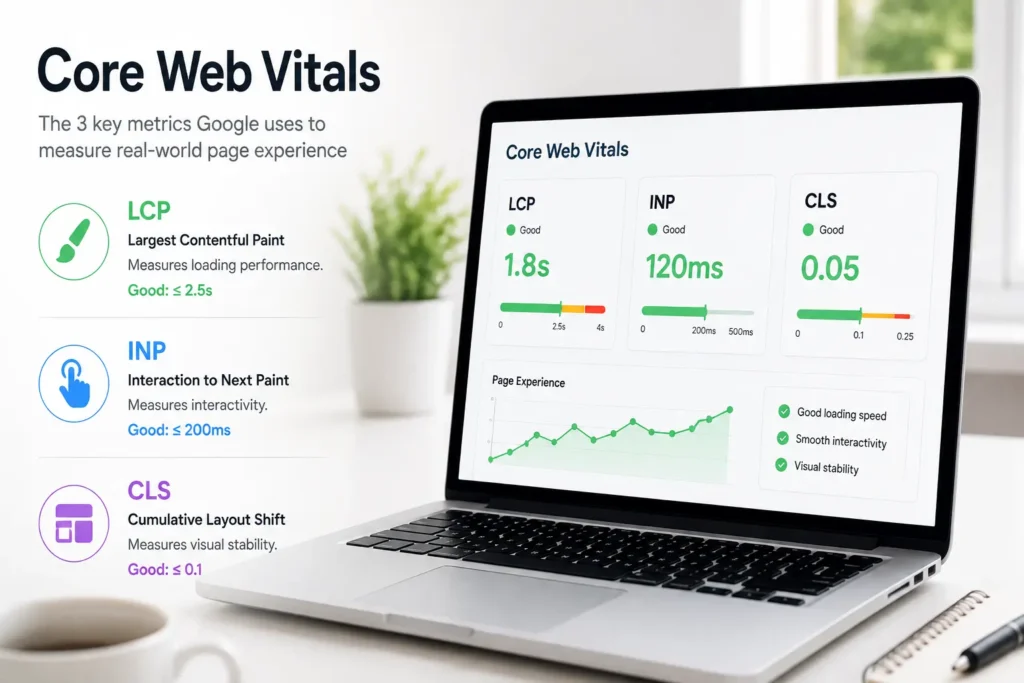
Each of these metrics feeds directly into how Google evaluates your website speed SEO performance. You can check your own scores for free using Google Search Console’s Core Web Vitals report or PageSpeed Insights, both of which show real-world data collected from actual visitors to your site, not just a simulated test environment.
How Website Speed Affects Local Rankings
For local businesses, website speed SEO interacts directly with the local ranking factors covered in our broader local SEO strategy — relevance, distance, and prominence. Speed doesn’t replace these factors, but it influences prominence indirectly by shaping how visitors and Google’s own crawlers experience your site.
A slow website can also limit how much of your site Google is able to crawl and index efficiently. Search engines allocate a limited “crawl budget” to each site, and if pages load slowly, fewer pages may get crawled within that budget, which can leave newer content — like a recently published service page or blog post — sitting unindexed longer than it should. This makes website speed SEO particularly relevant for local businesses that regularly add new location pages, service pages, or blog content, since a fast site helps that new content get discovered and ranked faster.
Local competitors are often evaluated side by side by real customers comparing several businesses at once before choosing who to call. If your site loads noticeably slower than a competitor’s, that difference alone can be enough to lose the click and the job, regardless of how strong your actual content or reviews are.
How Website Speed Affects Conversions
While the ranking impact of website speed SEO gets a lot of attention, the conversion impact is often even more dramatic and immediate. Research on user behavior consistently shows that as page load time increases, the likelihood of a visitor abandoning the page before it finishes loading increases sharply — often within the first few seconds.
For local service businesses, this translates directly into lost calls and lost bookings. Someone searching “emergency plumber near me” with a burst pipe isn’t going to patiently wait for a slow site to load — they’ll hit the back button and call the next result instead. Website speed SEO isn’t just about ranking higher in that search; it’s about actually capturing the customer once they’ve clicked through.
Speed also affects conversion rate even among visitors who do wait for a page to load. A slow, laggy experience creates a subtle but real sense of friction and distrust — visitors may wonder whether a business with an outdated, sluggish website is equally outdated in how they run their actual operations. A fast, smooth website reinforces the opposite impression: that this is a modern, well-run business worth trusting with the job.
What Actually Slows a Website Down
Understanding the common causes of slow load times is essential to any effective website speed SEO effort. The most frequent culprits include:
- Oversized, uncompressed images — high-resolution photos uploaded directly without compression or resizing
- Excessive third-party scripts — chat widgets, tracking pixels, embedded videos, and ad scripts that each add their own loading delay
- Poor quality or shared hosting — budget hosting plans that struggle under real traffic loads
- Unoptimized code — bloated themes, unnecessary plugins, or inefficient custom code
- No caching configured — forcing the server to rebuild the same page from scratch for every single visitor
- Render-blocking resources — CSS and JavaScript files that delay the page from displaying content until they’ve fully loaded
- Too many redirects — each redirect adds additional load time before the final page begins loading
Most websites suffer from a combination of several of these issues rather than just one, which is why a proper website speed SEO audit typically requires reviewing multiple areas rather than fixing a single setting and expecting dramatic results.
How to Test Your Website Speed
Before making changes, establish a clear baseline as part of your website speed SEO process. A few reliable, free tools include:
- Google PageSpeed Insights — provides both lab data and real-world Core Web Vitals scores, along with specific recommendations
- Google Search Console — shows Core Web Vitals performance across your entire site over time, based on real visitor data
- GTmetrix — offers a detailed breakdown of what’s slowing a specific page down, including a waterfall chart of every resource loaded
- WebPageTest — allows testing from different geographic locations and connection speeds, useful for understanding mobile performance specifically
Run these tests on your most important pages — your homepage, your top service pages, and any pages currently underperforming in search — rather than testing only your homepage and assuming the results apply site-wide. Different pages often have different speed issues depending on their content and design.
Step-by-Step: How to Improve Website Speed
Once you understand your baseline, here’s a practical process for improving website speed SEO:
Step 1: Compress and resize images. Use modern image formats like WebP, and resize images to the actual dimensions they’ll display at rather than uploading full-resolution originals and letting the browser scale them down.
Step 2: Enable browser caching. Configure your site so returning visitors don’t have to reload every resource from scratch on each visit.
Step 3: Minimize and defer unnecessary scripts. Audit third-party scripts and remove any that aren’t essential. For scripts you do need, use deferred or asynchronous loading so they don’t block the rest of the page from displaying.
Step 4: Upgrade your hosting if needed. If your site is on budget shared hosting and struggling under normal traffic, moving to a faster host or a managed hosting plan built for your platform can make a significant difference.
Step 5: Minify CSS and JavaScript. Remove unnecessary code, spacing, and comments from your site’s CSS and JavaScript files to reduce their file size.
Step 6: Use a content delivery network (CDN). A CDN serves your site’s static resources from servers geographically closer to each visitor, reducing load times, particularly for visitors farther from your primary server location.
Step 7: Reduce redirect chains. Audit your site for unnecessary redirects and update internal links to point directly to final URLs rather than routing through multiple redirect hops.
Step 8: Re-test and monitor. After making changes, re-run your speed tests to confirm improvement, and check back periodically, since new plugins, images, or scripts added over time can gradually slow a site back down.
Mobile Speed: Why It Matters Even More
Google evaluates websites primarily using mobile-first indexing, meaning the mobile version of your site is what’s actually used to determine your rankings. This makes mobile performance the true center of gravity for website speed SEO, not just a secondary consideration alongside desktop speed.
Mobile visitors also frequently browse on inconsistent connections — walking through a store, sitting in a car, or standing in a house with a broken appliance and spotty Wi-Fi. A site that loads acceptably fast on a fast office broadband connection can feel dramatically slower under real mobile conditions, which is why testing specifically on simulated mobile connections, not just desktop broadband, is an essential part of any thorough website speed SEO review.
Website Speed and Your Google Business Profile
Website speed doesn’t just affect your organic rankings — it also affects the experience of visitors who click through to your website directly from your Google Business Profile. A slow website undermines an otherwise well-optimized profile, since visitors who click your website link expecting a fast, trustworthy experience may bounce immediately if the page is slow to load. For the full picture of getting your profile right, see our guide on Google Business Profile optimization, and pair it with the website speed SEO improvements covered here so both sides of your local presence work together.
This connection matters even more for industry-specific sites with heavier content and imagery, like the service and location pages discussed in our HVAC website SEO guide. A site built with strong structure and content but poor speed still loses visitors at the final step, which is why speed deserves the same attention as page structure and keyword targeting.
Common Website Speed Mistakes
Even businesses that understand the importance of website speed SEO often undermine their own results with avoidable mistakes:
- ❌ Uploading full-resolution images without compression
- ❌ Installing too many plugins or third-party scripts
- ❌ Ignoring mobile speed while only testing on desktop
- ❌ Using budget hosting that can’t handle real traffic
- ❌ Never re-testing after making design or content changes
- ❌ Treating speed as a one-time fix instead of ongoing maintenance
- ❌ Adding new features or widgets without checking their speed impact first
Website Speed SEO Checklist
- ☐ Test current speed with PageSpeed Insights and Search Console
- ☐ Compress and resize all images
- ☐ Enable browser caching
- ☐ Minimize and defer unnecessary scripts
- ☐ Evaluate whether your hosting needs an upgrade
- ☐ Minify CSS and JavaScript
- ☐ Implement a CDN if serving visitors across a wide area
- ☐ Reduce unnecessary redirects
- ☐ Test mobile speed specifically, not just desktop
- ☐ Re-test and monitor speed on a regular schedule
Frequently Asked Questions
What is website speed SEO? Website speed SEO is the practice of optimizing how quickly a website loads and becomes usable, since load time is a factor Google uses when ranking pages and a major driver of whether visitors convert.
How much does website speed actually affect rankings? Speed is one of several ranking factors Google considers, particularly through Core Web Vitals. It’s rarely the single deciding factor, but it can be the difference between two otherwise similarly relevant pages.
What’s a good page load time? Aim for a Largest Contentful Paint under 2.5 seconds and an overall page load time under 3 seconds, especially on mobile connections.
Does website speed affect conversions as much as rankings? Often more. Slow-loading pages see significantly higher abandonment rates, meaning even visitors who find your site through search may leave before ever seeing your content or contact information.
How do I check my website’s speed? Use free tools like Google PageSpeed Insights, Google Search Console’s Core Web Vitals report, or GTmetrix to get both a score and specific recommendations for improvement.
Is mobile speed more important than desktop speed? Yes. Google uses mobile-first indexing, meaning your mobile site’s performance is what’s primarily used to determine your rankings, even for visitors browsing on desktop.
Can I improve website speed myself, or do I need a developer? Some steps, like image compression and reducing unnecessary plugins, are manageable without technical expertise. More advanced changes, like hosting migrations or code minification, often benefit from a developer’s help.
How often should I check my website speed? Check at least quarterly, and any time you make significant changes to your site, such as a redesign, a new plugin, or a large content update.
Final Thoughts
Website speed SEO sits at a rare intersection where a single improvement benefits both your search rankings and your bottom line directly. A faster website ranks better, keeps more visitors on the page long enough to convert, and reinforces the impression that your business is professional and well-run.
Start by testing your current speed, then work through the fixes that offer the biggest impact first — usually image compression and reducing unnecessary scripts. Pair these improvements with the broader technical and content strategy covered in our Complete Local SEO Guide for Small Businesses, and treat website speed SEO as an ongoing part of your site maintenance rather than a one-time project. The businesses that stay fast consistently outperform the ones that let speed quietly slip over time.
