
Waking up to find your Google Business Profile suspended is one of the most stressful things that can happen to a local business owner. One day your listing is showing up in the map pack, taking calls, and driving directions requests. The next day, it’s gone — no phone number, no reviews, no photos, sometimes no listing at all. If you haven’t reviewed your listing in a while, our Google Business Profile optimization guide is a good place to start once you’re reinstated.
If your Google Business Profile suspended notice just landed in your inbox, you’re not alone. Suspensions have become far more common as Google leans harder on AI-driven enforcement to catch spam, fake listings, and policy violations. In fact, in April 2026, business owners across California reported a mass suspension wave where hundreds of long-standing, fully verified profiles were suddenly flagged for “Deceptive Content” — many with no prior warning and no clear explanation.
The good news: a Google Business Profile suspended notice is very often recoverable. This guide walks through exactly why suspensions happen, the different types of suspensions you might be facing, and the step-by-step process for getting your listing reinstated as quickly as possible.
Quick summary: If your Google Business Profile suspended notice just appeared, don’t panic and don’t create a new listing. Identify the cause, fix it, gather supporting documents, and submit a reinstatement request.
What Does It Mean When Your Google Business Profile Is Suspended?
When your Google Business Profile suspended status is triggered, Google has temporarily (or in severe cases, permanently) removed your listing’s visibility from Google Search and Google Maps. This means:
- Your business no longer appears in local “near me” searches
- Your listing disappears from the local map pack
- Customers can’t call, message, or request directions through your profile
- Your reviews, photos, and posts may become invisible or inaccessible
- Your website traffic and calls from Google Maps can drop to zero almost overnight
Google suspends profiles as part of an effort to keep local search results accurate and trustworthy — removing spam listings, fake businesses, and profiles that violate its guidelines. Unfortunately, this same system sometimes catches legitimate businesses too, especially in industries Google’s algorithms treat as higher-risk for spam, such as legal services, medical practices, HVAC, locksmiths, and garage door companies.
“Not all suspensions are equal. Some are straightforward and resolved quickly, while others require deeper review.” — a pattern echoed across nearly every local SEO agency tracking suspensions in 2026.
Soft Suspension vs. Hard Suspension
Not every Google Business Profile suspended case looks the same. There are two distinct types, and knowing which one you’re dealing with changes how you respond.
Soft Suspension:
- Your business profile is still visible to the public
- You lose access to management and administrative controls
- You can’t edit your listing, respond to reviews, or update information
- Often triggered by suspicious edit patterns or minor guideline violations
Hard Suspension:
- Your entire listing is completely removed from Search and Maps
- Customers cannot find your business at all through Google
- Usually the result of more severe or repeated policy violations
- Requires a full reinstatement appeal with supporting documentation
Understanding which type you’re facing is the first step in figuring out how serious the issue is and what kind of response Google will expect from you.
Why Was My Google Business Profile Suspended? (Common Causes)
If you’re dealing with a Google Business Profile suspended notice, the cause usually falls into one of these categories:
- Keyword-stuffed business name — Adding extra descriptive words or services into your business name (e.g., “Joe’s Plumbing – Best Emergency Plumber Dallas”) rather than using your real, legal business name
- Address inconsistencies — Using a virtual office, UPS Store, P.O. Box, or an address that doesn’t match your other business records
- NAP mismatches — Your name, address, or phone number doesn’t match exactly across your website, citations, and directories
- Duplicate listings — Multiple profiles exist for the same location, creating a conflict in Google’s system
- Wrong or overly broad category — Selecting a category that doesn’t accurately reflect your business
- Rapid or bulk edits — Making several changes to your profile at once, which can trigger automated review flags
- High-risk industry classification — Being in a category Google scrutinizes more heavily, such as legal, medical, home services, or locksmith businesses
- Suspicious activity signals — Unusual account access patterns, shared logins, or edits from unfamiliar locations
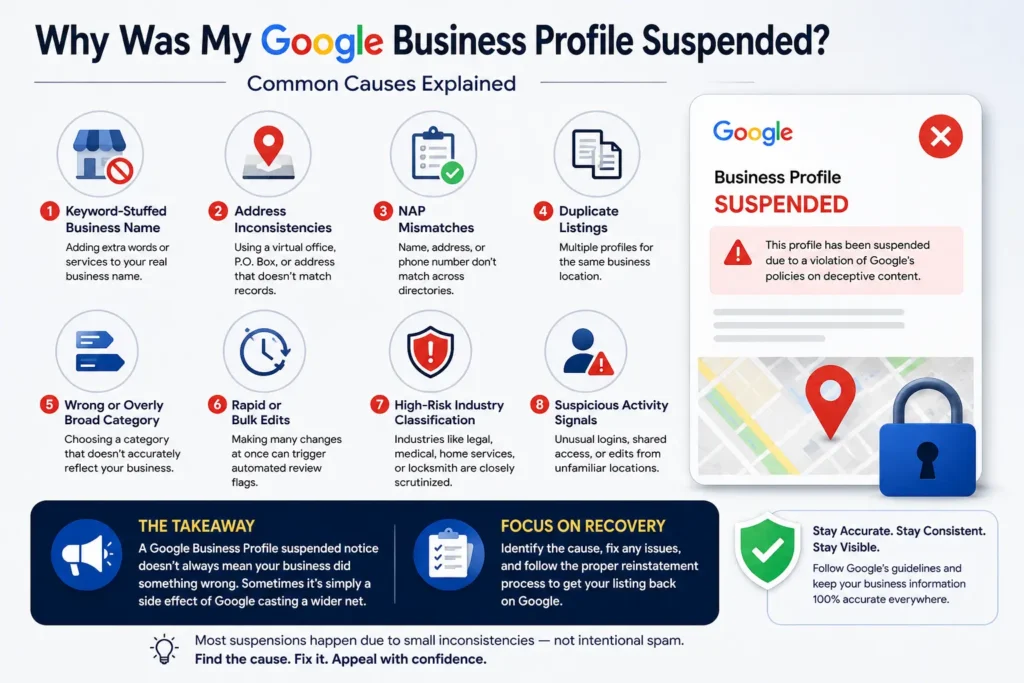
Most of the time, a suspension doesn’t mean you did something intentionally wrong. It’s often a minor inconsistency or an outdated detail that tripped an automated filter — but Google’s systems don’t distinguish between honest mistakes and deliberate spam. That’s exactly why identifying the specific cause matters so much before you appeal.
The 2026 Mass Suspension Wave: What Happened
If you searched “Google Business Profile suspended” recently and found yourself in good company, there’s a reason. On April 27, 2026, business owners across California reported waking up to suspension notices with no warning — their listings vanished from Google Maps and local search results overnight, all flagged with the same generic “Deceptive Content” violation.
What made this wave unusual:
- Many affected profiles had been verified through Google’s official video verification process
- Long-standing listings with years of history and strong review counts were hit
- Some businesses that had previously appealed and been reinstated were suspended again
- The suspensions weren’t limited to a single managing account — even listings where the original account had been removed were affected
Local SEO professionals describe events like this as “mass suspension waves” — broad, automated enforcement sweeps Google periodically runs using AI-driven systems. These waves aren’t new, but they’ve grown more frequent and more aggressive throughout 2025 and 2026 as Google shifts away from manual review toward algorithmic detection at scale.
The takeaway: a Google Business Profile suspended notice doesn’t always mean your business did something wrong. Sometimes it’s simply a side effect of Google casting a wider net — which is exactly why a calm, methodical reinstatement process matters more than ever.
Step-by-Step: How to Recover if your Google Business Profile suspended
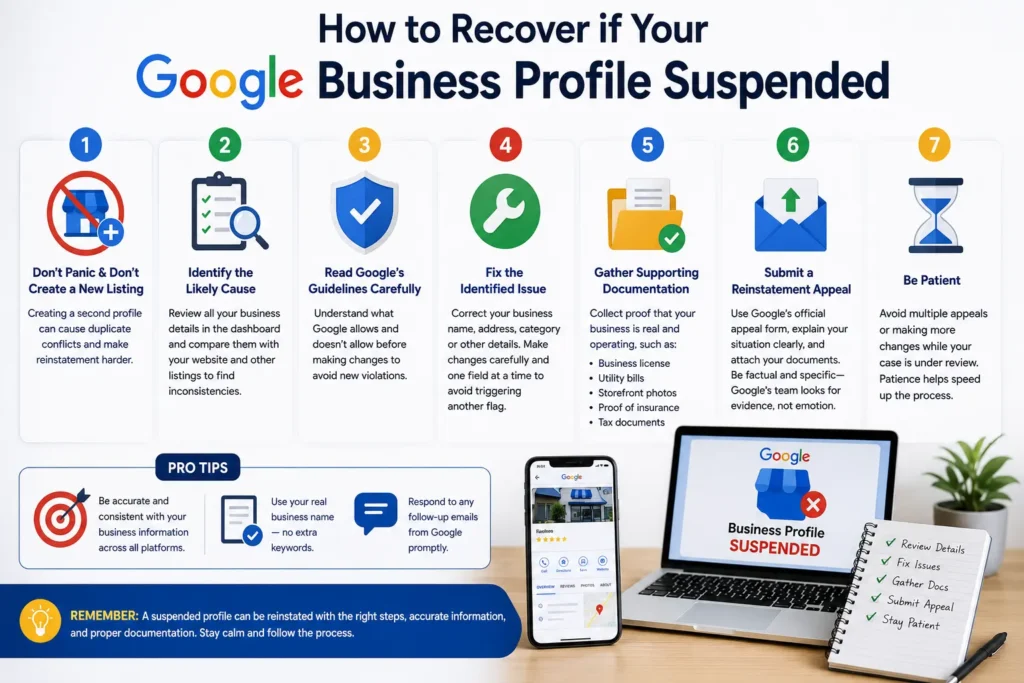
Here’s the process to follow when you’re dealing with a Google Business Profile suspended situation:
Step 1: Don’t panic, and don’t create a new listing. Creating a second profile is one of the most common mistakes business owners make. It almost always leads to duplicate listing conflicts and can make reinstatement of your original profile harder, not easier.
Step 2: Identify the likely cause. Log into your Google Business Profile Dashboard (if you still have access) and review every detail — business name, address, phone number, category, description, hours, and photos. Compare everything against your website and other online listings to spot inconsistencies.
Step 3: Read Google’s Business Profile guidelines carefully. Make sure you understand exactly what Google allows and doesn’t allow before making any changes, so you don’t introduce a new violation while fixing the old one.
Step 4: Fix the identified issue. Correct your business name to match your real, legal branding. Update your address if it’s a virtual office or P.O. Box. Align your category with what your business actually does. Make changes carefully and one field at a time — rapid, bulk edits can trigger another automated flag.
Step 5: Gather supporting documentation. Collect proof that your business is real and operating, such as:
- Business license or registration documents
- Utility bills showing your business address
- Photos of your signage and storefront
- Proof of insurance
- Tax documents showing your legal business name
Step 6: Submit a reinstatement appeal. Use Google’s official reinstatement request form, clearly explain the situation, and attach your supporting documents. Be factual and specific rather than emotional — Google’s review team is looking for evidence, not persuasion.
Step 7: Be patient. Avoid submitting multiple appeals back-to-back or making additional changes while your case is under review, as this can slow the process down or trigger further scrutiny.
What to Include in Your Reinstatement Appeal
A strong appeal for a Google Business Profile suspended case should include:
- ✅ A clear, factual explanation of what happened and what you’ve corrected
- ✅ Your legal business name exactly as it appears on official documents
- ✅ Proof of your physical business address
- ✅ Evidence the business is currently active and operating
- ✅ Screenshots or documentation showing the corrected information
- ✅ Consistent contact information matching your website and citations
Avoid vague statements like “please help, I don’t understand why this happened.” Google’s reinstatement reviewers respond far better to specific, documented, verifiable claims.
How Long Does Reinstatement Take?
Timelines vary depending on the severity of the suspension:
- Straightforward soft suspensions: Often resolved within a few days to two weeks
- Hard suspensions with documentation issues: Can take several weeks
- Cases requiring escalation or manual review: May take a month or longer, particularly during mass suspension waves when Google’s review teams are handling higher volumes
If your appeal is denied, review the denial reason carefully, correct any remaining issues, and resubmit rather than repeatedly appealing the same unresolved problem.
How to Prevent Future Suspensions
Once you’ve resolved your Google Business Profile suspended issue, protecting your listing going forward should become part of your regular routine:
- Use your exact legal business name — never add extra keywords or services
- Keep your NAP information identical across your website, citations, and directories
- Avoid using virtual offices, UPS Stores, or P.O. Boxes as your listed address
- Make edits slowly and one at a time rather than in bulk
- Log into your dashboard at least monthly to check for unauthorized or automatic changes
- Limit account access to trusted team members only
- Keep your category selection accurate and specific to your actual services
“The businesses that will dominate local search in 2026 and beyond are the ones treating their Google Business Profile with the same attention they give their website.” This kind of ongoing monitoring isn’t optional anymore — it’s the baseline for staying visible.
Preventing suspensions long-term comes down to the same fundamentals covered in our Google Business Profile optimization guide — accurate categories, consistent NAP, and regular activity
Mistakes to Avoid After a Suspension
When dealing with a Google Business Profile suspended notice, avoid these common missteps:
- ❌ Creating a duplicate listing instead of fixing the original
- ❌ Making large, sweeping changes all at once
- ❌ Submitting multiple appeals in quick succession
- ❌ Ignoring the specific violation reason Google provided
- ❌ Using inconsistent information across your appeal and your live listing
- ❌ Assuming the suspension will resolve itself without action
Google Business Profile Suspended Recovery Checklist
- ☐ Confirm whether it’s a soft or hard suspension
- ☐ Review your listing for name, address, and category issues
- ☐ Check NAP consistency across your website and citations
- ☐ Read Google’s current Business Profile guidelines
- ☐ Correct the identified issue carefully
- ☐ Gather business license, address proof, and signage photos
- ☐ Submit a factual, documented reinstatement appeal
- ☐ Wait for Google’s response without submitting duplicate appeals
- ☐ Set up monthly monitoring to prevent future suspensions
Frequently Asked Questions
Why was my Google Business Profile suspended if I didn’t change anything?
Often it’s because Google’s automated systems re-scanned your listing against updated guidelines, or a signal outside your profile — like a mismatched citation or a new duplicate listing — triggered the flag.
How do I know if my Google Business Profile suspended notice is a soft or hard suspension?
If your listing is still visible publicly but you can’t log in or edit it, that’s a soft suspension. If your business has disappeared entirely from Search and Maps, that’s a hard suspension.
Can I create a new Google Business Profile if my old one is suspended?
No. This is one of the most common and most damaging mistakes. Creating a new listing usually leads to duplicate listing conflicts and can complicate recovery of your original profile.
How long does it take to recover a suspended Google Business Profile?
Straightforward cases often resolve within days to two weeks. More complex hard suspensions, or suspensions tied to mass enforcement waves, can take several weeks or longer.
Will a Google Business Profile suspended issue hurt my SEO rankings?
Yes. While suspended, you lose map pack visibility, review signals, and local citation value — all factors Google uses in local organic rankings. The longer a listing stays suspended, the more that visibility can erode.
What documents do I need to appeal a suspension? Business license or registration documents, proof of address (like a utility bill), signage photos, and any other evidence confirming your business is legitimate and currently operating.
Is a Google Business Profile suspended notice always my fault?
Not necessarily. Mass suspension waves, like the one seen in April 2026, have affected fully verified, long-standing profiles with no policy violations at all. Sometimes it’s simply the result of broader algorithmic enforcement.
Can my Google Business Profile be suspended again after reinstatement?
Yes. Some businesses have been reinstated only to be suspended again in later enforcement waves, which is why ongoing monitoring and strict NAP consistency matter even after recovery.
Final Thoughts
A Google Business Profile suspended notice can feel like your business has disappeared overnight — and in terms of local visibility, it effectively has. But in most cases, it’s a recoverable problem, not a permanent one. The key is responding methodically: identify the real cause, fix it carefully, gather solid documentation, and submit a clear, factual reinstatement appeal. A suspended profile is a setback, not a strategy — for the full picture of how your Google Business Profile fits into your broader visibility, see our Complete Local SEO Guide for Small Businesses.
Once your profile is back, don’t treat the issue as resolved and forgotten. Build a simple monthly habit of checking your listing for accuracy, and keep your business name, address, and category consistent everywhere your business appears online. That ongoing attention is what separates businesses that recover once from businesses that stay visible for good.
