
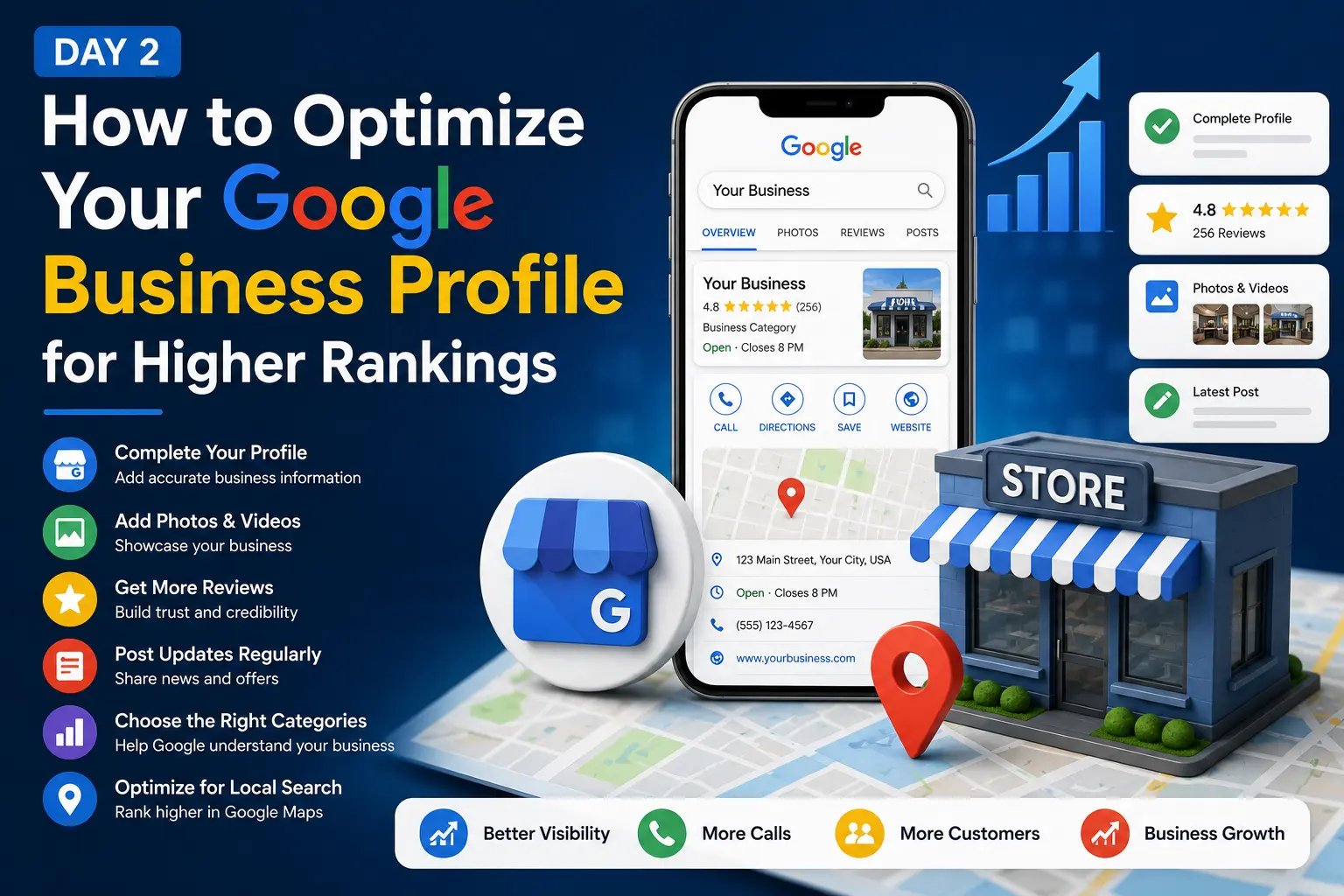
If you want your business to show up when local customers search on Google, Google Business Profile optimization is the single most important task on your entire local SEO to-do list. Your Google Business Profile (GBP) is what appears in the map pack, in Google Maps, and often at the very top of the search results page — before your website even gets a chance to show up.
Most small business owners claim their profile once, fill in the basics, and never touch it again. That’s a mistake. Google Business Profile optimization is not a one-time task; it’s an ongoing process that directly determines whether you show up for “near me” searches, how many calls you get, and how you stack up against competitors in your city.
In this guide, you’ll learn exactly how to approach Google Business Profile optimization step by step — from claiming and verifying your listing, to choosing the right categories, writing a keyword-rich business description, collecting reviews, and using every feature Google offers to boost your visibility. Whether you’re a plumber in Texas, a dentist in Florida, or a roofer in Ohio, the same principles apply.
By the end of this article, you’ll have a complete, actionable framework for Google Business Profile optimization that you can start implementing today — no technical experience or paid tools required, just a clear plan and some consistent time each week.
Why Google Business Profile Optimization Matters
Before diving into the how-to, it’s worth understanding why Google Business Profile optimization deserves so much of your attention. Google uses your profile as one of the primary sources of truth about your business — your name, address, phone number, categories, services, hours, and reviews all feed directly into how Google decides where to rank you in local search results.
A fully optimized profile signals to Google that your business is active, legitimate, and relevant to the searches people are making. An incomplete or outdated profile does the opposite — it tells Google your business may not be trustworthy or currently operating, which can quietly push you below competitors who’ve done the work.
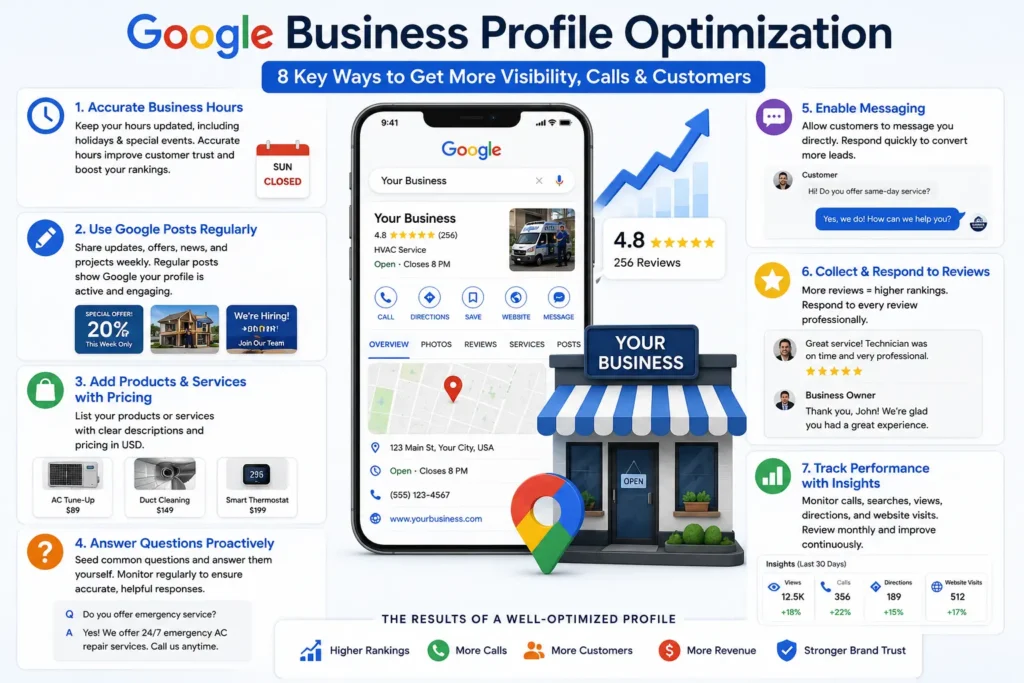
The businesses that dominate the local map pack aren’t necessarily the biggest or the oldest. They’re almost always the ones that have invested consistent time into Google Business Profile optimization — filling out every available field, posting regularly, and actively managing their reviews and photos.
It also helps to understand that Google Business Profile optimization isn’t just about ranking higher — it directly shapes the customer’s decision-making process once they’ve found you. A searcher comparing three local businesses in the map pack will often choose based on which profile looks the most complete, active, and trustworthy at a glance: recent photos, a strong review count, quick response times, and clear service listings all influence that split-second decision before a single click happens.
Claim and Verify Your Profile
The first step in any Google Business Profile optimization strategy is making sure you actually own and control your listing. If you haven’t claimed your profile yet, search for your business name on Google, click “Own this business?”, and follow Google’s verification process — usually a postcard, phone call, or email verification depending on your business type.
An unclaimed or unverified profile can’t be edited, which means you’re leaving your online reputation and local visibility entirely in Google’s default hands. Verification is also a trust signal in itself; Google is far more likely to rank verified, actively managed profiles above unverified ones.
If your business has multiple locations, make sure each individual location has its own verified profile rather than combining locations under one listing — this is a critical, often overlooked part of proper Google Business Profile optimization for multi-location businesses.
It’s also worth periodically checking whether anyone else has requested ownership access or made unauthorized edits to your profile, which can happen more often than business owners expect. Reviewing your account’s user access list every few months is a simple safeguard that protects all the optimization work you put in.
Choose the Right Business Categories
Category selection is one of the most impactful — and most commonly mishandled — parts of Google Business Profile optimization. Your primary category tells Google what kind of searches you should appear for, so choosing the most accurate, most specific option available matters enormously.
For example, a business that installs and repairs air conditioning units should select “HVAC contractor” rather than a broader category like “Contractor.” The more specific your primary category, the more precisely Google can match you to relevant local searches.
You can also add secondary categories to capture additional relevant searches, but don’t add categories that only loosely apply to your business — this dilutes relevance rather than expanding it. A good rule of thumb for Google Business Profile optimization: if fewer than half your customers would recognize a category as something you genuinely offer, leave it off.
Add a Complete List of Services
Listing every service you offer is a simple but often skipped part of Google Business Profile optimization. Each service you add gives Google more specific content to match against searches — someone searching “drain cleaning” is more likely to find you if “drain cleaning” is explicitly listed as a service on your profile, rather than being buried inside a general description.
Add short, clear descriptions to each service where the option is available, and make sure your service list matches what’s on your website. Consistency between your profile and your website strengthens the relevance signals Google uses to rank you.
Write an Optimized Business Description
Your business description is a valuable, often underused space in Google Business Profile optimization. This is your chance to explain, in your own words, what you do, who you serve, and where you operate — while naturally including relevant keywords.
Avoid keyword stuffing here. A description that reads like a list of search terms looks unnatural to both customers and Google. Instead, write two to four sentences that clearly communicate your services, service area, and what makes your business a good choice, while naturally weaving in the terms customers actually search for.
Add Your NAP Information Correctly
NAP stands for Name, Address, and Phone number, and getting this exactly right is foundational to Google Business Profile optimization. Your NAP information on your profile must match your website and every other online listing exactly — down to abbreviations like “St.” versus “Street.”
Inconsistent NAP information across the web confuses Google’s understanding of your business and can hold back your rankings even if every other part of your profile is well optimized. Double-check your NAP against your website footer, your citations, and any directories you’re listed on.
Upload High-Quality Photos and Videos
Profiles with regularly updated photos consistently earn more clicks, calls, and direction requests than profiles with few or outdated images. This makes photo management an essential, ongoing part of Google Business Profile optimization.
Upload photos of your storefront, your team at work, completed projects, and your service vehicles if applicable. Avoid generic stock photography — customers and Google both respond better to authentic, real images. Add new photos regularly rather than uploading a batch once and forgetting about it; profiles with fresh, recent photos tend to perform better in local search results.
Keep Your Business Hours Accurate
Accurate business hours might seem like a small detail, but it plays a real role in Google Business Profile optimization. Incorrect hours frustrate customers who show up to a closed business, and Google tracks behavioral signals like this over time.
Update your hours for holidays and special events well in advance, and use the “special hours” feature rather than leaving your regular hours unchanged during periods when you’re closed or operating differently.
Use Google Posts Regularly
Google Posts are one of the most underused tools in Google Business Profile optimization. Posts let you share updates, promotions, recent projects, and announcements directly on your profile, where they’re visible to anyone who finds your listing.
Posting regularly — ideally weekly — signals to Google that your profile is actively managed, which supports better rankings. It also gives you free, direct visibility to potential customers browsing your listing, without needing to drive them to a separate website or social media page first.
Add Products and Services with Pricing
If your business sells identifiable products or packaged services, add them directly to your profile with clear names, descriptions, and pricing in USD. This is a valuable part of Google Business Profile optimization that many businesses skip entirely, even though it gives customers the information they need to make a decision without ever leaving the search results page.
For service businesses, this might mean listing service packages (e.g., “AC Tune-Up — $89”). For retail businesses, it means showcasing your actual product catalog with current pricing.
Answer Questions Proactively
The Questions & Answers section is public and searchable, which makes it a meaningful part of Google Business Profile optimization that’s easy to overlook. Anyone can ask a question, and anyone can answer — including people who aren’t affiliated with your business, which can sometimes lead to inaccurate answers if you’re not paying attention.
Proactively seed this section with the questions you know customers commonly ask, and answer them yourself with accurate, helpful information. Monitor the section regularly so you can respond quickly to new questions before someone else answers incorrectly.
Enable Messaging
Enabling messaging on your Google Business Profile gives potential customers a fast, low-friction way to reach out — often faster than a phone call or a contact form. As part of a complete Google Business Profile optimization strategy, messaging can capture leads who might otherwise move on to a competitor while trying to decide whether to call.
Respond quickly. Slow response times to messages can lose you a customer who is also messaging two or three competitors at the same time.
Collect and Respond to Reviews
Reviews are one of the strongest ranking signals tied directly to your profile, which makes review management a critical part of ongoing Google Business Profile optimization. More recent, high-quality reviews correlate strongly with better local rankings and higher conversion rates.
Build a simple, repeatable process for requesting reviews — a text message or email shortly after a job is completed works well, when the experience is still fresh in the customer’s mind. Just as important, respond to every review you receive, positive or negative. Thoughtful, specific responses show both customers and Google that your profile is actively and professionally managed.
Avoid generic, copy-pasted replies. A response that references the specific service or detail mentioned in the review demonstrates genuine engagement, and it gives future customers reading your profile a much clearer sense of how you handle real feedback — good or bad. This level of care is a small but meaningful piece of ongoing Google Business Profile optimization that most competitors skip entirely.
Track Performance with Insights
Google Business Profile provides built-in Insights showing how customers find and interact with your listing — including how many people called, requested directions, or visited your website directly from your profile. Reviewing these metrics regularly should be part of your Google Business Profile optimization routine, since they show you what’s actually working.
If you notice a drop in calls or views, it’s often a sign that something needs attention — outdated hours, missing photos, a drop in review activity, or a change in your competitors’ own optimization efforts. Comparing month-over-month trends rather than reacting to single-week dips gives you a clearer picture of whether your Google Business Profile optimization efforts are actually moving the needle.
Set a recurring reminder to check Insights at the same time each month, and keep a simple log of the changes you make alongside the results you see. Over a few months, this record becomes one of the most useful tools you have for understanding which parts of your optimization routine are worth the most time.
Common Google Business Profile Mistakes
Even businesses that understand the basics of Google Business Profile optimization often undermine their own results with avoidable mistakes:
- ❌ Leaving the profile unclaimed or unverified
- ❌ Choosing a broad or inaccurate primary category
- ❌ Ignoring the Questions & Answers section
- ❌ Uploading few or outdated photos
- ❌ Letting reviews go unanswered
- ❌ Inconsistent NAP information across the web
- ❌ Never posting updates or offers
Avoiding these mistakes is often just as impactful as any single optimization technique, since each one directly undermines the trust and relevance signals Google relies on.
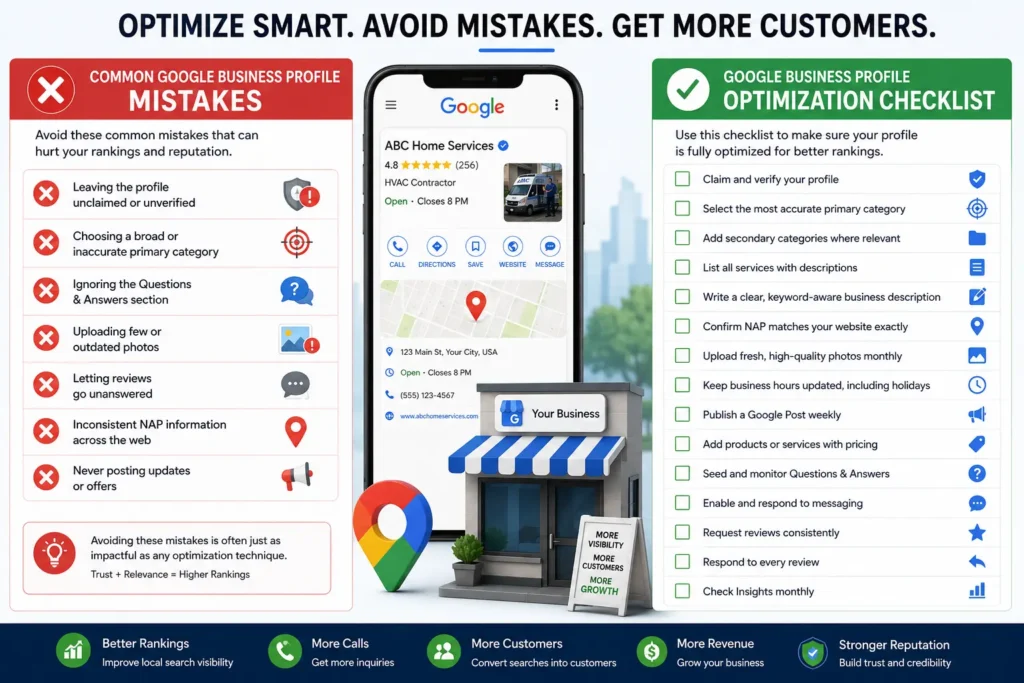
Google Business Profile Optimization Checklist
Use this checklist to track your progress:
- ☐ Claim and verify your profile
- ☐ Select the most accurate primary category
- ☐ Add secondary categories where relevant
- ☐ List all services with descriptions
- ☐ Write a clear, keyword-aware business description
- ☐ Confirm NAP matches your website exactly
- ☐ Upload fresh, high-quality photos monthly
- ☐ Keep business hours updated, including holidays
- ☐ Publish a Google Post weekly
- ☐ Add products or services with pricing
- ☐ Seed and monitor Questions & Answers
- ☐ Enable and respond to messaging
- ☐ Request reviews consistently
- ☐ Respond to every review
- ☐ Check Insights monthly
Frequently Asked Questions
What is Google Business Profile optimization? Google Business Profile optimization is the process of completing and actively managing every element of your GBP listing — categories, services, photos, hours, posts, and reviews — to improve your visibility in local search results and Google Maps.
How long does Google Business Profile optimization take to show results? Most businesses start seeing improved visibility within a few weeks of thorough optimization, though full local ranking improvements typically build over two to three months as reviews and activity signals accumulate.
Is Google Business Profile optimization free? Yes. Every core feature — categories, photos, posts, services, Q&A, and messaging — is free to use. The only cost involved is the time it takes to complete and maintain them.
How often should I update my Google Business Profile? Aim to check your profile weekly. Add new photos, publish a post, respond to any new reviews or questions, and confirm your hours are accurate, especially around holidays.
Does Google Business Profile optimization help with Google Maps rankings? Yes. Your Google Business Profile is the primary data source Google uses to rank businesses in Google Maps, so optimizing it directly improves your visibility there as well as in standard local search results.
Do I need a website if I optimize my Google Business Profile? A website isn’t strictly required to appear in Google Maps, but pairing strong Google Business Profile optimization with a well-built website significantly improves your overall local search performance and gives customers more ways to learn about and choose your business.
What’s the biggest mistake businesses make with Google Business Profile optimization? The most common mistake is treating it as a one-time task. Businesses that claim their profile, fill in the basics, and never return to update photos, post content, or manage reviews consistently fall behind competitors who treat it as an ongoing process.
Final Thoughts
Google Business Profile optimization isn’t a single task you complete and check off — it’s an ongoing commitment that pays off in more calls, more website visits, and more customers over time. Every field you complete, every photo you upload, and every review you respond to adds another signal that tells Google your business is active, trustworthy, and relevant to the people searching for what you offer.
Start with the fundamentals: claim and verify your profile, choose the right category, and complete every section available to you. From there, build a simple weekly routine around photos, posts, and reviews. Businesses that commit to consistent Google Business Profile optimization consistently outrank competitors who treat their listing as a one-time setup task — and that visibility translates directly into real business growth.
If you only have thirty minutes a week to dedicate to your local presence, spend it here. Few other marketing activities offer this level of return for so little ongoing effort, and unlike paid advertising, the results of steady Google Business Profile optimization tend to compound rather than disappear the moment you stop spending. Treat your profile as a living part of your business — one that deserves the same regular attention as your website or your storefront — and the rankings, calls, and customers will follow.
